Screen recorder. Nothing ever leaves your device.
On this page
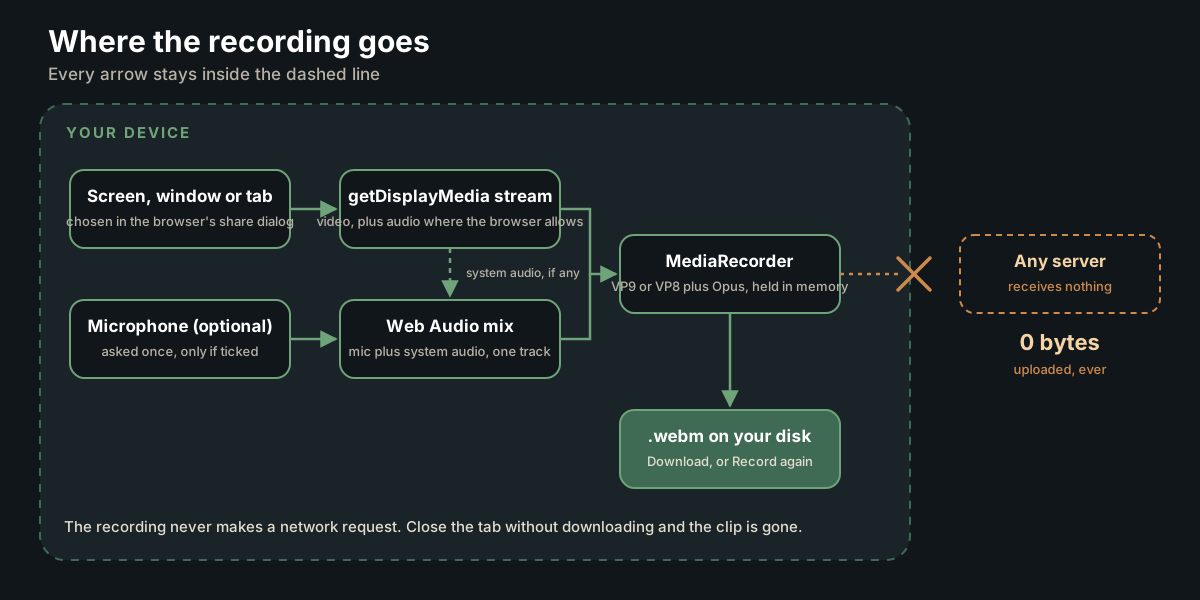
Recording happens locally on your device, nothing is uploaded.
This screen recorder is a free, browser-only tool for anyone who needs to record their screen, a window or a tab with sound and keep the file. It sets no time limit and adds no watermark; the clip is written to a .webm on your device, so no server ever sees it.
Why record in the browser?
Two of the recorders compared further down work differently: Bandicam is installed desktop software, and ScreenRec auto-saves every video to a private cloud account. This tool uses the browser’s own MediaRecorder and Screen Capture APIs, so the whole recording stays on your device. Choose whether to include your microphone, pause and resume without splitting the clip, then preview and save a .webm.
How to use the Screen Recorder
This recorder captures a browser tab, a single window or a whole screen, with sound where the browser provides it, and saves the result as a .webm video. It uses the browser's own screen sharing and MediaRecorder features, so the clip is built on your device. Use it for bug reports, client walkthroughs, how to videos and demos.
Step by step
-
Decide on narration
Tick Include microphone before you start if you want to talk over the recording. Your voice is mixed with any tab or system audio into one track. The browser asks for microphone permission the first time. The box is locked while a recording runs.
-
Start and choose what to share
Press Start recording. Your browser opens its own share dialog. Pick a tab, a window or an entire screen, leave the audio switch on if the dialog shows one, and confirm. The timer starts at 00:00 and a red dot pulses while recording.
-
Pause when you need to
Press Pause to hold the recording and the timer, then Resume to carry on. The paused gap is left out, and the clip stays one file.
-
Stop the recording
Press Stop when you are done. Ending the share from the browser's own sharing bar stops the recording too. The clip then appears under Your recording with a player so you can watch it back.
-
Save the file
Press Download .webm to save it as screen-recording.webm. Press Record again to clear the preview and reset the timer for a new take.
Reading the result
- The line beside Your recording shows the file size, the recorded length and the format, in the order size · mm:ss · WebM. The length is the timer's final reading, so it leaves out any paused time. The size depends on what was on screen and on the browser's default bitrate.
- The timer shows minutes and seconds, and adds hours once a recording passes 60 minutes, as in 01:05:30.
- If the clip has no sound, the browser did not hand over audio for that surface. Tab audio is the most reliable; whole screen system audio depends on the browser and operating system.
- If a message says Nothing was recorded, the share ended before any video arrived. Start again and keep sharing until you press Stop.
Tips and common mistakes
- Make a five second test first and play it back to check the sound before a long take.
- Share a single tab or window rather than the whole screen to keep notifications and other apps out of the video and the file smaller.
- On two monitors, keep this page on the screen you are not recording so the controls stay out of the clip.
- Download before you press Record again or Start recording, because the previous clip is discarded and cannot be recovered.
- If microphone permission is refused, the recording carries on with screen audio only. Allow the microphone in the browser's site settings and start again to add your voice.
Privacy and limits
Recording happens in your browser and the video is held in memory on your device. Nothing is uploaded and nothing is saved until you download it, so closing the tab before Download .webm loses the clip. There is no time limit in the code, but very long recordings are limited by your device's memory. It needs a desktop browser with screen capture support, such as current Chrome, Edge or Firefox; most phone browsers show a notice instead.
Everything a screen recorder should do.
The recorder does the six things a capture needs and nothing that would need a server: pick a surface, take the audio the browser offers, add your voice, pause, preview and save. Each one maps to a button or a checkbox on the card above, and the list below says what each does.
- Record any screen, window or tab with one click, through the browser’s own share dialog.
- Capture system or tab audio wherever the browser passes it (see the audio table below).
- Mix in your microphone to narrate; the voice and the system audio become one track.
- Pause and resume without splitting the clip; the timer stops with it.
- Preview the recording with full playback controls, and see its size and length, before you save.
- Download a .webm file straight to your device: no upload, no account, no watermark, no cap.
- Screen only, by design. For screen plus webcam with picture in picture, use the Video Editor, which also records locally.
Which audio ends up in the file.
You can get three kinds of sound: the audio of a shared tab, the system audio of a shared screen, and your microphone. Which of the first two arrive depends on the browser. The microphone is the one source that works everywhere, which is why the Include microphone box sits above the Start button.
Mozilla’s guide to the Screen Capture API is blunt about it: capturing audio “is always optional”, and a stream requested with audio and video “may still have only one video track, with no audio” (MDN, Using the Screen Capture API). Google’s own browser recorder states that screen and tab audio recording is supported only on Chrome and Chromium-based browsers (Google Admin Toolbox).
This tool asks for video and audio with no other constraints (the call is getDisplayMedia({video: true, audio: true})) and records whatever comes back. If you ticked the microphone, it mixes your voice and the system audio into one track with the Web Audio API. If the browser hands back video only, you still get the recording, with your voice on it if the box was ticked.
| Source | Comes through? | What to do |
|---|---|---|
| Your microphone | Yes, on every supported browser, when the box is ticked. | Tick it before Start; the browser asks for permission once. |
| A shared tab’s audio | Chrome and other Chromium-based browsers, in Google’s wording. | Share the tab and leave the audio switch in the dialog on. |
| A shared screen’s system audio | The same browsers, and only where the operating system’s dialog offers it. | Make a five-second test first; the stream may arrive with no audio track. |
| A webcam | Not here. | Use the Video Editor, which records screen and webcam together. |
No time limit, no watermark, and what the others cap.
This recorder has no recording cap in its code and draws nothing on top of the video. The practical limit is your device’s free memory, because the clip is held in the browser until you press Stop. The table lists the free-tier limits the other recorders print on their own sites, as their own pages stated them when we read them on 6 and 7 October 2026.
| Recorder | Free-tier cap | Where the file goes |
|---|---|---|
| This tool | No cap in the code; memory is the only limit. No watermark. | Your device, as a .webm. Nothing is uploaded. |
| Bandicam (free version) | Up to 10 minutes per recording. | Your PC; it is an installed desktop app. |
| Kommodo (online) | Recordings limited to a maximum of 1 hour. No watermark. | Browser-based. |
| ScreenPal (online recorder) | “No strict time limit”; the only limits are “based on memory and the size of your screen recorder.” No watermark. | Browser-based; its page points to a paid desktop app for unlimited recording. |
| ScreenRec | Title promises no time limit and no watermark; 1080p at 15 to 120 FPS. | Auto-saved to “your private cloud account” with a sharing link. |
| Google Admin Toolbox | Desktop and laptop devices only; audio only on Chrome and Chromium browsers. | Browser-based. |
Caps are copied from each product’s own page on the date given and can change; the links go to the pages they came from.
Windows, Mac, Linux, Chromebook, and what a phone owner should use.
The recorder runs in any current desktop browser that has the Screen Capture and MediaRecorder APIs, which today means Chrome, Edge and Firefox on Windows, macOS, Linux and ChromeOS. Phones are different: iPhone and Android both ship a recorder inside the system, so there is nothing to install there either.
The page checks for both APIs when it loads and shows a notice instead of the controls if either is missing. That is the same reason Google’s browser recorder says it “supports only desktop and laptop devices”, and why Kommodo answers the Windows, Mac or Chromebook question with every desktop system and any modern browser.
Apple’s support article Record the screen on your iPhone, iPad, or iPod touch covers it: with Screen Recording added to Control Center, swipe down from the top-right corner, tap the gray Record button and wait for the three-second countdown.
Google’s Android Help page Take a screenshot or record your screen on your Android device gives the steps: swipe down twice from the top, tap Screen record, choose what to record and tap Start; stop it from the notification.
One window, one tab, or a second monitor.
The share dialog is the browser’s own and offers three kinds of surface: a browser tab, a single window, or a whole screen. On a desk with two monitors each screen is listed on its own, so pick the one that holds the app. There is no region crop here; share a window instead.
MDN describes the surfaces a browser can offer as the contents of a tab, a complete window, and a monitor or a group of monitors combined into one. Bandicam’s desktop app answers “Can I record multiple screens?” with yes, dual or multiple monitors; a browser recorder records one surface per clip, so record each monitor as its own take if you need both.
Two habits save re-takes. Keep this page on the monitor you are not recording, so the controls and the timer stay out of the clip. And share a tab rather than the whole screen when a notification could pop up; a tab share captures that tab only.
Resolution, frame rate and file size.
The tool passes no width, height or frame-rate constraint to the browser, so the browser sizes the capture from the shared surface itself; no 1080p ceiling is written into this page. Frame rate and bitrate are the browser’s defaults. ScreenRec states 1080p at 15 to 120 FPS; here the browser decides from your screen.
The container is WebM with VP9 video where the browser supports it, VP8 otherwise, and Opus audio; the tool tries those in order and takes the first the browser accepts. After you press Stop, the size and length appear next to the preview, so you know what you are about to send before you download.
A long take at 4K makes a big file. Share a window rather than the whole screen to keep the frame small, pause while nothing is happening, and run the result through the Video Compressor if it has to travel by email.
Who records their screen, and for what.
The jobs people bring to a recorder are short: a bug shown to a developer, a walkthrough of a staging site for a client, a how-to for a colleague, or a demo of a feature before a sprint review. Each replaces a paragraph of description with thirty seconds that show the clicks, the timing and the error.
Record the tab, tick the microphone and say what you expected to happen. A clip that shows the exact clicks and the moment the error appears is the fastest thing a developer can receive; it holds the state a written ticket leaves out.
Share the window with the staging site, narrate the flow, and send the file with the link. The client watches at their own pace, and the recording is the record of what was shown on that date.
Pause between sections and resume; the clip stays whole and the timer waits. One recording of a process beats a document that goes stale the next time the interface changes.
We run fortnightly sprints with daily IST standups, so a demo recorded once spares whoever missed the call a second meeting. Record the demo, trim it, and drop it in the sprint notes.
After you stop: trim, convert to MP4, compress, or pull the audio.
A .webm plays in current browsers and most media players. When a recipient’s app wants MP4, or the clip needs cutting, the tools below take the file next, all of them in the browser with nothing uploaded. Kommodo lists a WebM to MP4 converter beside its recorder for the same reason; ours is the trim tool.
Frequently asked questions.
How can I do my screen recording?
On a computer, open this page, tick Include microphone if you want narration, click Start recording and pick a tab, window or screen in the browser’s share dialog. Press Stop when done, then Download .webm. The file is written on your device; nothing is uploaded, and there is no account to create.
How can I screen record for free?
Use a recorder that is free without a catch. This one has no account, no time limit in its code, no watermark and no upload; the only limit is your device’s memory. For comparison, Bandicam’s free version stops each recording at 10 minutes and Kommodo’s online recorder caps a recording at one hour, as their pages state.
Where is my screen recorder on my phone?
It is built into the phone. On Android, swipe down twice from the top of the screen and tap Screen record in Quick Settings; Google’s Android Help page describes the steps. On an iPhone, swipe down from the top-right corner to open Control Center and tap the gray Record button. This page’s recorder is for desktop browsers only.
Does the iPhone screen record?
Yes. Apple’s support article Record the screen on your iPhone, iPad, or iPod touch explains it: add Screen Recording to Control Center, swipe down from the top-right corner, tap the gray Record button and wait for the three-second countdown. The countdown gives you time to leave Control Center. You do not need an app or this page on an iPhone.
Is there a recording time limit?
No cap is written into this tool: the recorder runs until you press Stop or end sharing from the browser. The practical limit is memory, because the clip is held in the browser until it is saved, so split a very long session into a few takes. ScreenPal’s online recorder describes the same memory-based limit on its own page.
Will my recording have a watermark?
No. The tool records the stream your browser hands it and writes it to a .webm; it draws nothing on top, adds no logo and no trailing card. There is no paid tier that removes anything, because there is nothing to remove. Open the file in any player and the frame is exactly what you shared.
Does it work on Windows, Mac, or Chromebook?
Yes, in a current desktop browser on Windows, macOS, Linux or ChromeOS. The page checks for two browser features, the Screen Capture API and MediaRecorder, and shows a notice if either is missing. Chrome, Edge and Firefox have both on a desktop or laptop. Most phone browsers do not, so use the phone’s built-in recorder there.
How do I record part of my screen?
Share a window or a tab instead of the whole screen; the browser’s share dialog offers all three. That keeps the recording to the one app or page you want, with nothing else in frame. There is no drag-to-crop region here. If you need to cut the length afterwards, the Video Trim and GIF tool does that locally.
Can I record multiple screens?
One surface per recording. On a two-monitor desk the share dialog lists each monitor as its own screen, so choose the one that holds the app and keep this page on the other, where the controls stay out of the clip. Bandicam’s desktop app offers an all-displays mode; a browser hands over one surface at a time.
How do I create a video with my voice?
Tick Include microphone before you press Start recording. The browser asks for microphone permission once, then the tool mixes your voice with whatever system or tab audio the browser passes, using the Web Audio API, into a single audio track. If you leave the box unticked, only the shared surface’s own audio is captured, where the browser supports it.
How do I make a GIF from a screen recording?
Record the clip here, download the .webm, then open it in our Video Trim and GIF tool, cut it to the few seconds you want to show and export a GIF. Both steps run in your browser with nothing uploaded.
Last reviewed .

More from Divyansh.
Chief Technology Officer · Lucknow · 57 posts on the site
Published · Last updated .


