ring 01 · app store
Review queue, signing, provisioning, privacy labels, TestFlight. Every shipped iOS app passes this ring.
We are a New York iOS app development company for apps that use enough of Apple's frameworks to make cross-platform the wrong call, built around measurable business goals. Our iOS development process covers Swift 6 and SwiftUI builds, Live Activities, widgets, App Clips, HealthKit integration, XCTest coverage, TestFlight releases, and App Store submission.
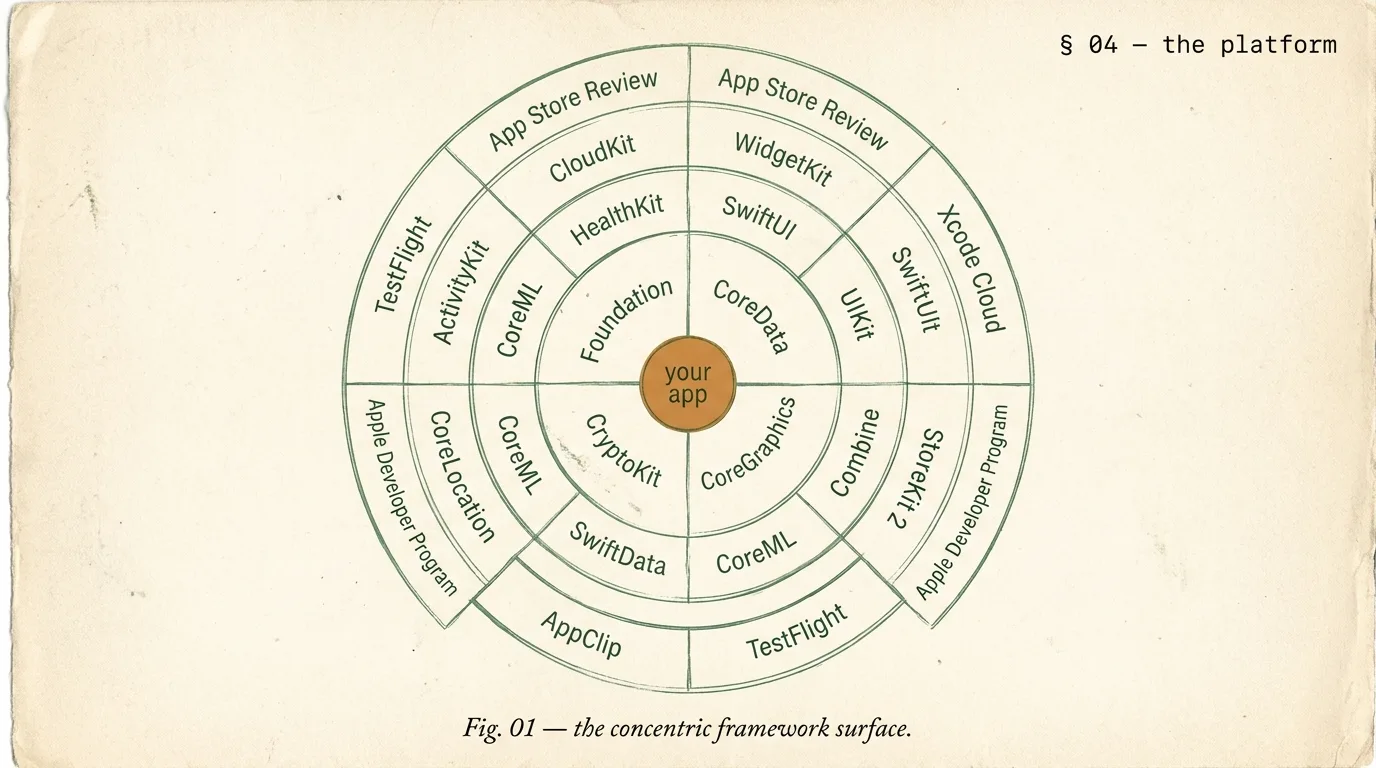
Every iOS app sits on a five-ring stack. The outermost ring is App Store submission and signing. Inside that lives SwiftUI, plus the platform affordances only SwiftUI exposes: WidgetKit, Live Activities, App Clips, visionOS volumes. The next ring is UIKit, for the edge cases SwiftUI hasn't reached.
Deeper still sit Foundation and the specialized frameworks: HealthKit, StoreKit 2, CoreML, CloudKit. At the core is your app's logic in Swift 6. Knowing which ring a feature lives in tells you how much of Apple's platform you are actually using.
Review queue, signing, provisioning, privacy labels, TestFlight. Every shipped iOS app passes this ring.
Declarative UI, Widgets, Live Activities, App Clips, focus filters, visionOS volumes. Default for new builds.
Still needed for complex collection views, legacy interop, some framework edges. Clean SwiftUI interop.
HealthKit, StoreKit 2, CoreML, CoreLocation, CloudKit. Where Apple-platform apps earn their feel.
Your domain. Strict concurrency, actors, async/await. Non-negotiable for 2026 builds.
Count how many rings your app uses. Apps that use only rings 1-2 could be React Native. Apps using 3-5 are genuinely native.
SwiftUI is production-ready now. Every Apple platform feature shipped since 2020 (Widgets, Live Activities, App Clips, visionOS, focus filters) is SwiftUI-first or SwiftUI-only. UIKit still bridges edge cases cleanly via UIViewRepresentable and UIHostingController. The table shows when to use each.
| need | SwiftUI (default) | UIKit (where) |
|---|---|---|
| navigation | NavigationStack, NavigationSplitView | legacy UINavigationController integration |
| lists + collections | List, LazyVGrid, LazyVStack | UICollectionViewCompositionalLayout edge cases |
| widgets + live activities | SwiftUI only | not applicable |
| app clips | SwiftUI only | not applicable |
| visionOS | SwiftUI + RealityKit | not applicable |
| complex video or AR | SwiftUI + UIViewRepresentable wrapping | AVKit, ARKit bridged |
The animation below traces the five-ring stack from the outer App Store layer down to your Swift 6 domain core. Knowing which ring each feature sits in is the central architectural conversation every iOS engagement opens with.
Every iOS app has an icon and screens. What makes an app feel native, not ported, is the Apple platform surface it uses. That means Live Activities on the Lock Screen. Widgets on Home Screen and Today View. App Clips that launch without install. HealthKit for health data your app genuinely owns. Below is the platform surface we ship when your use case warrants it.
Ongoing real-time updates on Lock Screen + Dynamic Island. Orders, rides, matches, workouts.
Home Screen + Today View + StandBy + Lock Screen widgets via WidgetKit and ControlWidget.
Launch-without-install flows for point-of-sale, parking, menus, one-tap use cases.
Read + write health data with user permission. Workouts, heart rate, mindfulness, sleep.
On-device ML: image classification, text recognition, sound classification, custom models.
In-app purchases and subscriptions. Swift-native API, signed transaction receipts, family sharing.
iCloud-backed sync across user devices. Public and private databases, no server needed.
Spatial volumes, RealityKit content, Look-to-Dwell. When the brand fits spatial computing.
Three layers of testing build confidence. Swift Testing handles unit tests on logic, view models, and async code. XCUITest covers critical user flows. TestFlight distributes to real beta testers (up to 10,000 external users), collects crashes, and gathers feedback per version. Every build runs through CI (Xcode Cloud or GitHub Actions) first.
We ship with performance budgets. Cold launch under 1.5s on iPhone 12+. 120 FPS scroll on ProMotion. Apps under 35 MB thinned. 99.8%+ crash-free over 30 days. All verified on real hardware, not simulators, because the App Store ranks on real-world signals.
| metric | target | note |
|---|---|---|
| cold launch | < 1.5s | iPhone 12 + newer |
| warm launch | < 400ms | in-process resume |
| scroll fps | 120 fps | ProMotion-capable devices |
| binary size | < 35 MB | thinned IPA |
| crash-free | > 99.8% | 30-day rolling |
Two industry archetypes based on real patterns we see. The health tracker uses HealthKit, WidgetKit, and Live Activities. The fintech app uses Apple Pay, Secure Enclave, and biometric auth. Both represent the kind of native-depth iOS work we typically ship. For an Austin fintech client, the same Secure Enclave and biometric patterns are scoped on our page on fintech and mobile apps for Austin companies.
Health and fitness tracker with HealthKit integration for workouts, heart rate, sleep. WidgetKit for Home Screen and Lock Screen. Live Activities for in-progress workouts. SwiftUI + Swift 6. 16 weeks.
Consumer fintech app, iOS launched first. Live Activities for transfers in progress. Apple Pay integration, Sign in with Apple, biometric auth via LocalAuthentication, Secure Enclave. 18 weeks.
We start by scoping the right shape for your app. A 2-week readiness audit. A greenfield SwiftUI build. A UIKit-to-SwiftUI migration. A retainer with senior engineers. The right fit emerges before any contract.
2 weeks. Platform surface, Swift 6 path, review pre-check. Refundable.
10-16 weeks. SwiftUI + Swift 6 + store submit.
14-22 weeks. Live Activities, Widgets, Clips, HealthKit, IAP.
16-26 weeks. iPhone + iPad + visionOS one codebase.
Questions iOS teams ask before booking: SwiftUI vs UIKit. When to go iOS-first. App Store timelines. App Store Connect ownership. TestFlight scale. And exit terms.
Three signals favor native. First, you need Apple-platform features (Live Activities, Widgets, App Clips, HealthKit, CoreML, visionOS) where cross-platform frameworks don't or barely support them. Second, native feel and pixel-perfection matter more than sharing code across platforms. Third, you're iOS-only this year but plan multi-platform later; native buys validation time before cross-platform costs hit. Otherwise, React Native or Flutter with native modules handles 80% of use cases. We build all three. The choice depends on your app, not our preference.
Senior iOS engineers run $160 to $220/hour in the US and UK, $100 to $150/hour in India. A Swift 6 MVP with 15 to 25 screens, auth, and push takes 10 to 16 weeks. A full production app with Live Activities, Widgets, Clips, HealthKit, in-app purchases, and CloudKit runs 14 to 22 weeks. An iPhone + iPad + visionOS build from one codebase runs 16 to 26 weeks. A 2-week readiness audit is refundable. Scoped quote in 48 hours.
SwiftUI for new builds, always. SwiftUI is production-ready now. It handles navigation, scaled lists, collection layouts, animations, custom shapes, and platform surfaces (Widgets, Live Activities, visionOS) that UIKit doesn't touch. UIKit still wins in a few edge cases: very complex collection views needing fine-grained reuse, legacy UIKit codebases where mixing costs more than it saves, and some framework integrations not yet updated. For new builds: SwiftUI first, UIKit only where proven necessary.
You'll need Apple Developer Program membership ($99/year) under your legal entity. App Store Connect app record. Provisioning profiles and signing certificates (we handle these). App icons in every required size. Screenshots for every device you claim to support (iPhone 15 Pro Max, iPhone SE, iPad Pro 12.9, iPad Pro 11).
App Privacy label, Data Safety disclosure, privacy policy URL, support URL, and a Review contact are required too. First submissions take 1 to 3 days. Rejection rates have climbed since 2024's stricter guidelines. We run a pre-check before submit to catch common failures: account deletion flow, subscription disclosures, privacy manifest.
StoreKit 2 is the default for any new iOS build. It's Swift-first, async/await-native, and uses JWS-signed receipts verified directly, so no third-party validation service needed. We implement subscriptions, one-time and consumable purchases, intro and promotional offers, and family sharing. Backend validation uses Apple's App Store Server Notifications V2 for real-time events. For brands shipping across platforms (Apple, Google Play, web), we abstract the purchase layer so subscription logic works everywhere.
Yes. For universal apps (iPhone + iPad + visionOS), SwiftUI lets us share most code with platform-specific adaptations via conditional modifiers. iPad gets split view, slide over, sidebar navigation, pointer interactions, and keyboard shortcuts. visionOS adds 3D volumes, spatial audio, and Look-to-Dwell. We scope visionOS as an add-on when your use case fits spatial computing.
Swift 6 strict concurrency is non-negotiable for new builds. We enable complete concurrency checking from day one, use @Sendable and @MainActor correctly, and design data layers around actors. Async/await is the default for all I/O.
The first two weeks include a concurrency architecture pass where we decide which actors own which state. Teams new to Swift 6 may find this slower at first, but the payoff is zero data races and a codebase that compiles cleanly on every future Swift version.
You do. Apple Developer Program membership under your legal entity. Signing certificates and provisioning profiles stay in your developer account; we're added team members, removable anytime. GitHub repository under your organization from day one. TestFlight and App Store Connect access under your control. On exit: credentials rotated, repo transferred, CI documented, and 30 days of support. No lock-in.
Two weeks of deep review. Platform surface. Swift 6 migration path. App Store guidelines pre-check. Refundable. Quote in 48 hours.
Published reviews from our Fiverr profile, reproduced word for word. 397 public reviews across 4 gigs, from clients in 36 countries. Read them all on Fiverr.
What impressed me most was how quickly the idea turned into something that actually felt usable and complete. Communication was always clear, and every small detail was handled thoughtfully. Very satisfied with the final result.
I’ve worked with several developers over the years, but this project stood out because of the level of investigation and problem solving involved. What impressed me most was the willingness to understand the platform's logic before making changes. I would absolutely recommend working with them.
I think I gave the team a pretty big challenge, and I’m really happy with how everything’s turning out. They’ve been easy to work with, communication has been great, and they’ve been willing to make changes whenever I’ve asked. Looking forward to continuing the project.
Working with this team was a fantastic experience. The website turned out exactly how I envisioned, and every feature was implemented with great attention to detail. The final result looks clean, modern, and performs really well. I truly appreciate the professionalism and would definitely work together again on future updates. Highly recommended!
very very best team in the world, they are very confidence person they told and know everything about the project they understand me fast and know exactly what they want to make
The part I appreciated most was how every decision was explained from a business perspective rather than just a design perspective. The site feels polished, easy to navigate, and genuinely reflects the premium image we wanted for our laptop brand. Highly recommended for full stack website!!
Reviews are reproduced as published on Fiverr, captured 2026-08-03. Fiverr shows the buyer's username and country publicly; no other client detail is used here.









115 people across five studios in New York, Delhi, London, Sydney and Lucknow, shipping ecommerce, web, software and mobile work for founder-led brands. Senior engineers only, no account-manager relay, and the same team from kickoff to launch.

Senior Copywriter · New-york · 14 posts on the site
Published · Last updated .

Pinch, scroll or double-tap to zoom · drag to pan
Where should we send the proposal?
Please enter your name and a valid email.
Any faster way to reach you? Optional.
Please fill in the one you picked.

