reality 01
23 plugins, average.
Median plugin count across the sites we audit in 2026. Healthy sites we ship run 8 to 12. Past 25 plugins, you are paying plugin tax.
We are a New York WordPress development agency building custom sites that are faster to load, easier to edit, and built around measurable business goals. Our WordPress process covers plugin audits, custom Gutenberg block themes, pagebuilder exits, WooCommerce builds, headless Next.js frontends, content migration with 301 maps, Core Web Vitals remediation, and editor training.
Tell us about your WordPress site.
We audit WordPress sites every week. The pattern is always the same.
A page builder (Elementor or Divi) ships 600 KB of render-blocking JavaScript. Three caching plugins fight each other. Two backup plugins, one that hasn't run since 2023. An SEO plugin (Yoast or Rank Math), which deserves to be there. A form plugin that loads on every page instead of just the contact form. A membership plugin left over from a course launch that never happened.
Each plugin made sense when it was added. Together, that stack is why Core Web Vitals turn red, editors spend forty minutes per page, and your security surface becomes a walk-in closet.
Median plugin count across the sites we audit in 2026. Healthy sites we ship run 8 to 12. Past 25 plugins, you are paying plugin tax.
Typical Elementor or Divi build ships 400 to 800 KB of render-blocking JavaScript before the theme adds anything. That is why LCP sits above three seconds on mobile.
Pagebuilder sites average 45 to 90 minutes for a non-developer editor to ship a net-new page. A well-built Gutenberg block library cuts that to 8 to 15.
Each plugin is a possible CVE. Patchstack tracks over 4,000 WordPress plugin vulnerabilities a year. Abandoned plugins are the most common entry point.
Every WordPress site is four nested layers. Core, which you never edit. Must-use plugins, always-on with no admin toggle. Plugins, the big zone where bloat and security both live. And the theme, where performance is won or lost. A mature development practice separates what belongs in each. Most agencies conflate plugin logic with theme code and pay for it at upgrade time.
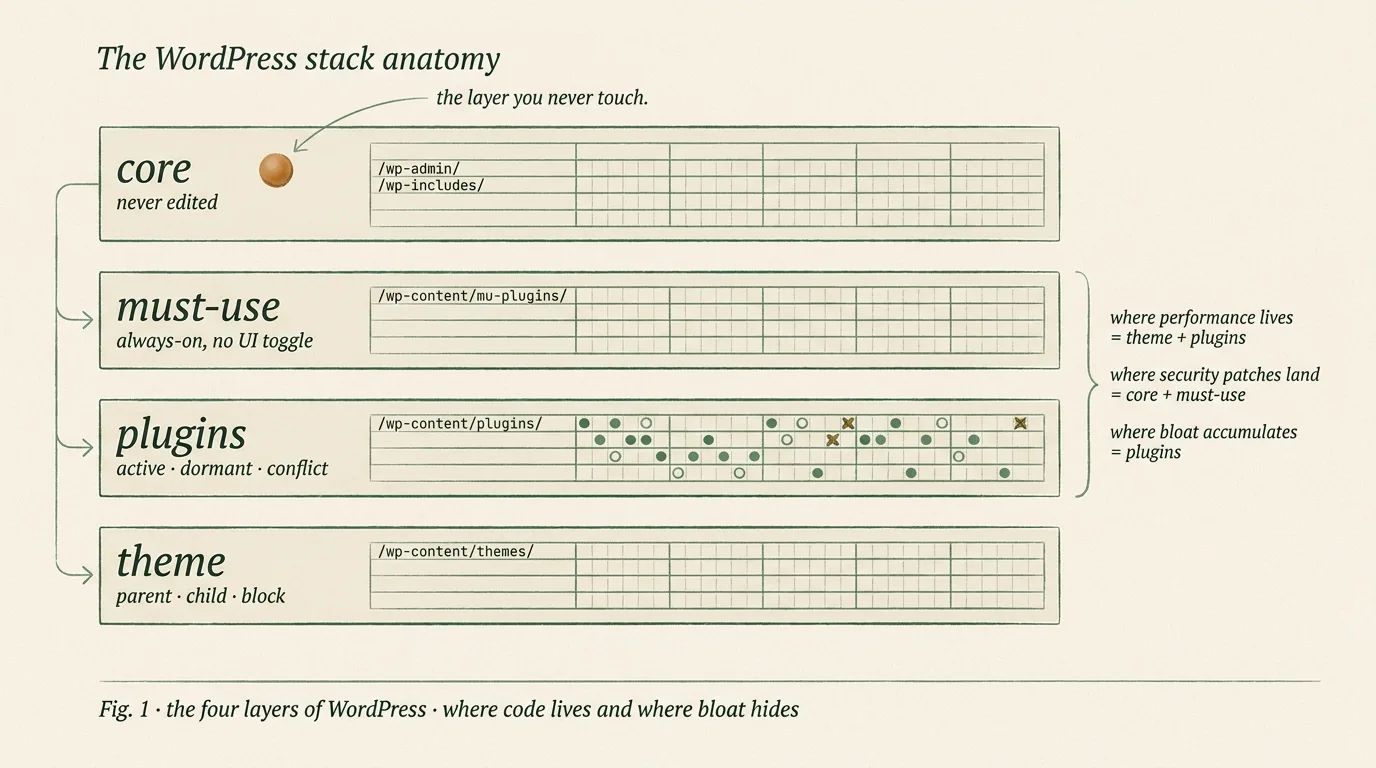
/wp-admin/ and /wp-includes/. The open-source WordPress engine, governed by the WordPress Foundation. Updated through the admin or via WP-CLI. If your agency is editing core files, find a new agency.
/wp-content/mu-plugins/. Cannot be deactivated by site editors. The right place for security hardening rules, admin-side logging, and essential helpers that should not be toggleable. Used correctly, this layer eliminates class of editor-caused outages.
/wp-content/plugins/. The layer where both bloat and security surface live. Active plugins load their assets on every page that matches their scope. Dormant plugins still take disk space and sometimes still run hooks. Conflict plugins actively break each other.
/wp-content/themes/. Parent theme, child theme, or modern block theme with theme.json. Template hierarchy, enqueued assets, block patterns. A well-built theme ships 40 to 120 KB of render-blocking JavaScript. A bad one loads jQuery across every page.
Twelve seconds. Twelve branches grow from a core trunk. Each branch is a plugin category: SEO, cache, backup, forms, Woo, ACF, security, payments. Three branches fail the audit and get pruned. The remaining stack is what we ship. This is what the Plugin Diet looks like in one frame.
The Plugin Diet is our two-week pre-engagement diagnostic. Ten checks, cross-referenced against the Patchstack vulnerability database and Core Web Vitals field data. Written report plus a 90-minute walkthrough. The fee is refundable against any engagement that follows. Deliverable is yours even if you hire someone else.
Every installed plugin measured against named purpose. Median 23; target 8 to 12.
Top 10 heaviest plugins profiled for render-blocking JS and CSS weight.
Mid-tier Android over throttled 4G. Homepage, product, top blog post. Biggest blocker for each metric.
Known-CVE plugins, XML-RPC status, 2FA coverage, REST rate limits, wp-config perms.
Inline styles, jQuery reliance, CPTs stuck in plugins, orphaned parts. Graded A-F with tickets.
Time a non-developer editor needs to ship net-new. Pagebuilder 45-90 min; Gutenberg 8-15 min.
Current host vs tier with named alternative. PHP 8.2+, object cache, WAF, CDN status.
wp_options autoload risk, post revisions, transients, spam. Queries per page load.
% rendered through block patterns vs legacy. theme.json, centralized design tokens.
Article + Breadcrumb schema, canonical integrity, sitemap health, hreflang, link depth.
Deliverable is a 30-page PDF with named plugins, measured numbers, and a ticketed 90-day remediation roadmap. Contact for quote on the audit itself; fee refunded against any engagement that follows.
Every WordPress build picks one of three paths. Gutenberg block theme with Full Site Editing. Classic theme with a template hierarchy. Headless WordPress feeding a Next.js frontend through WPGraphQL or Faust.js. The decision is rarely technical. It is a question of editorial workflow and who edits what.
| Classic theme | Gutenberg + FSE | Headless (Next.js) | |
|---|---|---|---|
| render model | PHP templates | PHP + block JSON | React on Vercel edge |
| editor control | classic editor, developer-led | full visual editor, block-composable | WP admin, preview via revalidation |
| dev team needed | PHP + CSS | PHP + JS + block.json | React + TypeScript + GraphQL + PHP |
| speed ceiling | good if disciplined | excellent with lean blocks | best available, at engineering cost |
| editorial velocity | low, every change needs dev | high, editors compose from patterns | moderate, preview loop is slower |
| best for | legacy sites being refactored | 80% of modern content-heavy builds | commerce, portals, app-shared code |
| wrong for | editor teams without dev support | teams needing non-WP cart logic | editorial sites with daily updates |
Eight of every ten custom WordPress builds we ship are Gutenberg block themes. Headless is the exception we talk most brands out of.
Pagebuilders got your brand to launch. Past $1M in revenue, they usually stop earning their place. Our exit playbook is a rebuild as a native Gutenberg block theme, with a before-and-after performance report and a documented editor training. Timeline is 8 to 14 weeks depending on how much of the source site is salvageable. We have done this for brands moving off each major pagebuilder; here is the decision framework and the shape of the work.
If a Lighthouse audit traces your waterfall back to the builder's render-blocking assets as the biggest blocker, the builder is the problem and no amount of caching will fix it.
If a non-developer editor cannot ship a new page in under 20 minutes because every template has drifted from the brand system, the builder's editor is no longer saving time.
When the pagebuilder subscription plus the plugin stack it requires costs more per year than a one-time custom theme rebuild would amortize, the math has flipped. Usually happens around 3 years in.
We run both platforms. Shopify wins when commerce is the entire business. WordPress wins when content is the reason people visit. The honest test is where your editorial team spends their week. If their hours live in product pages, metafields, and merchandising, stay on Shopify. If they live in long-form articles with commerce modules inside them, WordPress wins. The comparison is outcome-based, not feature-based.
| dimension | WordPress + Woo | Shopify + Plus |
|---|---|---|
| content ops | native long-form, custom post types, taxonomies | product pages first, blog an afterthought |
| SEO surface area | unlimited URL structure, full control | constrained, handled by theme |
| checkout | WooCommerce or plugin stack, you build trust | checkout is Shopify's moat, battle-tested |
| total cost to own | hosting + plugins + dev time | monthly fee + app stack + transaction fees |
| dev velocity | infinite flexibility, infinite responsibility | fast inside the guardrails, slow outside them |
| portability | your files, your database, your choice | checkout and orders lock you in |
Use Shopify if commerce is the full business. Use WordPress if content is. Use both (WordPress for content, Shopify headless for checkout) if you genuinely need both engines.
We have a named opinion for every revenue tier. PHP 8.2 or later, Redis object cache, Cloudflare in front. Below those three, no theme build matters. The migration off a bad host is frequently the biggest first-week win we deliver.
| tier | revenue band | our pick | why |
|---|---|---|---|
| starter | under $1M / year | Kinsta or Rocket.net | PHP 8.2+, Cloudflare Enterprise included, Redis object cache, staging |
| growth | $1M to $10M / year | WP Engine or Pantheon | proper dev / stage / prod workflow, global CDN, enterprise support |
| scale | $10M to $50M / year | Pantheon Gold or WP Engine Premium | dedicated database, Elasticsearch on Pantheon, uptime SLAs |
| enterprise | $50M+ / year, Fortune publishers | WordPress VIP | SOC 2, Fastly CDN, enterprise support, VIP GO stack |
We set up the stack we recommend as part of every engagement. No referral fees, no affiliate arrangements with any hosting provider. Our picks are based on what ships fast and stays up.
Patchstack tracks over 4,000 WordPress plugin vulnerabilities a year. Most breaches come from abandoned plugins, weak admin passwords, and XML-RPC still enabled in 2026. We run the same twelve-point hardening on every WordPress build and every inherited site. None of this is novel; almost no site we audit has all twelve in place.
Every WordPress build ships with a published Core Web Vitals SLA. Mid-tier Android over throttled 4G. The Chrome User Experience Report as referee. If numbers land over target at launch, we fix at no additional cost. Representative before-and-after numbers from a 2025 pagebuilder-exit migration below.
| metric | before (Elementor) | after (Gutenberg custom) | target |
|---|---|---|---|
| LCP | 4.8 s | 1.7 s | < 2.5 s |
| INP | 420 ms | 135 ms | < 200 ms |
| CLS | 0.31 | 0.03 | < 0.1 |
| Lighthouse mobile | 38 | 94 | > 90 |
| JS transfer (homepage) | 780 KB | 92 KB | < 150 KB |
| plugins active | 34 | 11 | 8 to 12 |
Fig. 3 · representative pagebuilder-exit numbers · anonymized client, 2025 Q4
WooCommerce is not a weaker Shopify. It is a different engine for a different use case. Content-heavy publishers with a merch arm. Professional-services firms selling digital products. Membership sites with commerce modules inside articles. Course platforms with long-form lesson pages plus a checkout. The question is never "Shopify vs Woo" as an abstract comparison; it is "where does the editorial team live."
A short field note from three WordPress engagements in the last 18 months. Numbers are real. Brand names anonymized to respect client NDAs; full named references available on request.
Editorial wellness brand on a heavily-customized Elementor build shipped 780 KB of JavaScript on the homepage, LCP at 4.8 seconds, 34 plugins active. Rebuilt as a custom Gutenberg block theme with 28 custom blocks via ACF Blocks, WooCommerce for a digital-product merch arm, migrated to Kinsta with Cloudflare in front. Cut JavaScript payload by 88%, plugin count to 11, editor time from 62 minutes per page to 11. Six-month post-launch organic traffic up 34% without any content changes.
SaaS marketing site needed React-level interactivity for an embedded product demo plus long-form editorial. Built headless on Next.js 14, WordPress as the content backend via WPGraphQL, Vercel deployment with ISR caching, editorial preview routing so editors see changes before publish. Lighthouse 98 mobile, editor training included a pattern library of 22 custom blocks.
Legal-services firm on a WordPress multisite network (28 sites, shared theme) with 41 active plugins, the top 4 all conflicting. Ran the Plugin Diet audit in week one, cut plugin count to 14 across the network in weeks 2-3, rebuilt the shared parent theme as a Gutenberg block theme with theme.json design tokens in weeks 4-7. Individual child sites kept their content without migration. Post-launch CWV green across every site in the network.
WordPress work against the wrong brief harms both sides. A custom theme build for a brand that needs a pagebuilder exit costs six weeks of wasted trust. Here is the honest filter we run on every intro call.
You own the theme, the plugins, the repository, and the hosting account on day one and on exit. Private GitHub repo under your organization. Documented editor training, Loom walkthrough, 30-day support tail at close. We do not gate access to force retention.
Pick the shape that matches the moment. We confirm fit on the intro call and send a scoped quote within 48 hours. Scope moves the price, not the conversation.
10-point diagnostic: plugin inventory, payload, CWV, security, theme debt, editor velocity, hosting, DB, Gutenberg readiness, SEO. PDF + walkthrough. Refundable against any engagement.
Gutenberg block theme with theme.json design tokens, 20 to 40 custom blocks via ACF or block.json, editor training, pattern library. CWV SLA included.
Migration off Elementor, Divi, Bricks, Oxygen, Breakdance. Rebuilt as native Gutenberg block theme. Before-and-after CWV report. Editor training included.
Next.js or Remix frontend, WPGraphQL or Faust.js layer, Vercel or Cloudflare deployment, ISR caching, editorial preview. For brands that need React interactivity.
Quotes sent within 48 hours of an intro call. Hosting + plugin + licensing costs billed by you direct to vendors; we never hold those accounts.
The New York WordPress work we take on is rarely a fresh install. It is usually a publisher or agency site carrying ten years of plugins, a page builder nobody wants to touch, and an editorial team that needs to publish five times a day without filing a ticket. The fix is normally fewer plugins, a block-based editing model the newsroom can actually use, and a real caching layer.
For media and nonprofit clients in the city, accessibility is frequently a procurement requirement rather than a nice-to-have, so we build to WCAG 2.2 AA and hand over the audit rather than asserting compliance.
Headless WordPress is on the table when the front end genuinely needs it, and off the table when it would just add a build step to a site that publishes fine as it is.
Mid-market WordPress work in the US and UK runs $125 to $185 per hour for senior engineers. Indian agencies run $75 to $125 per hour for the same caliber. But hourly rate matters less than project shape.
A custom Gutenberg theme build is 6 to 9 weeks. A pagebuilder-exit migration is 8 to 14 weeks. A headless build on Next.js plus WordPress is 10 to 16 weeks. The Plugin Diet audit is 2 weeks and refundable against any later work.
We send a scoped quote within 48 hours of your intro call. Scope moves the price, not the conversation.
No. WordPress powers 43% of all websites and 63% of known-CMS sites as of early 2026 (W3Techs).
What is dead is the 40-plugin builder stack held together with custom CSS overrides. The future is Gutenberg plus theme.json design tokens, custom blocks via block.json or ACF Blocks, and sparing plugin use.
Headless WordPress on Next.js through WPGraphQL or Faust.js is also valid when you need React-level interactivity with WordPress as a content backend.
Only when one of three signals lights up.
First: Core Web Vitals are red on mobile and Lighthouse proves the builder is the culprit. Second: Editors can't ship a new page in under 20 minutes because templates have drifted from your brand. Third: What you spend annually on builder subscriptions plus required plugins exceeds the one-time cost of a custom theme rebuild.
Without one of those signals, keep what you have. When the time comes, we rebuild as a native Gutenberg block theme with a before-and-after performance report.
Headless wins when you need React-level interactivity: app-like dashboards, real-time personalization, complex client-side state. Also wins when the site shares a codebase with a mobile app or when editorial content feeds multiple properties through one API.
Headless loses when the site is mostly editorial, edits happen daily, and your editors need to see exactly what visitors will see. Classic Gutenberg with theme.json is the right default for content-heavy sites.
We turn away more headless briefs than we accept. The extra engineering overhead is only justified when the interactivity or reuse truly demands it.
Shopify wins when commerce is the entire business. Checkout optimization becomes your daily job. Content serves the storefront.
WordPress with WooCommerce wins when content is why people visit and commerce is a secondary revenue stream. Think publishers with merch, professional-services firms selling digital products, course platforms, membership sites.
The real test is where your editorial team lives each week. Shopify's product pages and metafields? Stay on Shopify. Long-form articles with commerce modules inside them? WordPress wins. We run both platforms; see our Shopify development page for the counterpart.
Native Gutenberg wins on Core Web Vitals for almost every site we've benchmarked. A well-built block theme ships 40 to 120 KB of render-blocking JavaScript. Elementor and Divi ship 400 to 800 KB before your theme adds anything.
Bricks and Breakdance are closer to Gutenberg on speed but lose on interoperability. Their markup is proprietary and locks you into their editor.
Our default for a new build is Gutenberg plus ACF Blocks, with theme.json design tokens and a custom pattern library your editors can compose from.
The real question isn't count. It's payload weight and security surface. That said, sites we audit average 23 plugins; healthy sites we ship run 8 to 12.
A new content site launches under 10. A publisher with WooCommerce, membership, and editorial plugins sits between 15 and 20. Past 25, you're almost certainly paying plugin tax: duplicate features, abandoned plugins still active, trial plugins never removed.
Our Plugin Diet audit names each plugin's weight, overlap, and status so pruning decisions become obvious.
By tier. For sub-$1M revenue sites, Kinsta or Rocket.net gives you modern managed WordPress with Cloudflare Enterprise, Redis object caching, and PHP 8.2 for $35 to $115 per month.
For $1M to $50M brands with traffic spikes, WP Engine or Pantheon offer staging, global CDN, and proper development workflows.
For Fortune 500 and publishers, WordPress VIP is the defensible answer despite the cost. We set up the stack we recommend. Migration off bad hosting is usually week one's biggest performance win.
We run a twelve-point hardening pass on every build. Disable XML-RPC. Lock wp-config.php to 600. Disable file editing via DISALLOW_FILE_EDIT. Enforce 2FA on admin and editor roles. Rotate the admin URL away from /wp-admin. Rate-limit REST API endpoints.
Remove unused user accounts. Enforce strong passwords. Install a WAF at Cloudflare or Wordfence Premium. Set up malware scans on schedule. Subscribe to plugin vulnerability alerts via Patchstack or WPScan. Keep automatic background updates on for WordPress minor releases.
We ship this checklist with every engagement.
Six to nine weeks for a standard 20 to 60 page custom block theme with ACF Blocks, theme.json, pattern library, and editorial training.
Ten to sixteen weeks for a headless WordPress build on Next.js with WPGraphQL. Eight to fourteen weeks for a pagebuilder exit migration (more or fewer depending on how much of the source is salvageable).
The Plugin Diet audit is 2 weeks upfront and refundable against the build that follows. Rush timelines are possible, but we don't compress editorial QA. The timeline moves, not the standard.
Yes. We run every migration with a three-layer safety net. First, a full source-platform URL crawl with a URL-by-URL 301 map built in a spreadsheet you review. Redirect chain length capped at one hop.
Second, a structured-data preservation pass so Article, Product, and BreadcrumbList schema survives the move. Third, a 90-day post-launch ranking watch in Google Search Console where any URL dropping more than 5 positions gets same-week remediation.
We target 99% URL preservation on every migration. Short-term volatility in weeks 1 to 4 is normal. Long-term loss is a process failure, not a platform limitation.
You do. The theme and any custom plugins live in a private GitHub repository under your organization from day one. Hosting account on your billing. WordPress admin on your domain under your user, with DH engineers added as named users you can remove anytime.
Design assets (Figma, brand library, screenshots) go to a shared workspace you own. On exit, we transfer the repository, hand off documented editor training, record a Loom walkthrough for your team, and leave 30 days of support for questions.
We don't gate access to force retention. If we're the right partner, you'll renew because the work is good, not because the code is hostage.
Two weeks, ten-point scorecard, written report. You leave knowing exactly what a custom build, pagebuilder exit, or headless move would change. Scoped quote in 48 hours.
Published reviews from our Fiverr profile, reproduced word for word. 397 public reviews across 4 gigs, from clients in 36 countries. Read them all on Fiverr.
It was an outstanding experience from start to finish. The redesign perfectly captured the premium feel I was aiming for, and every suggestion I made was implemented with great attention to detail. I'd happily work together again for future improvements.
Absolutely fantastic work! The redesign exceeded my expectations, and every detail was handled professionally. Great communication, fast revisions, and a beautiful final website. Highly recommended!
Outstanding WordPress developer! The store redesign exceeded my expectations. The new design looks modern, loads fast, and the product comparison feature was implemented perfectly. Great communication, smooth revisions, and a truly professional WooCommerce experience. Highly recommended!
Outstanding experience. All requested features have transformed the user experience of our store. Highly skilled, reliable, and easy to work with. Looking forward to working together again on future projects.
Working with Shreyansh was a fantastic experienceThe website feels premium, easy to navigate, and perfectly suited for our brand. Communication was excellent throughout, and every detail was handled with care. Highly recommended!
Delivered exactly what I needed. The site customization was clean, responsive, and completed with great attention to detail. Would definitely work together again.
Reviews are reproduced as published on Fiverr, captured 2026-08-03. Fiverr shows the buyer's username and country publicly; no other client detail is used here.









115 people across five studios in New York, Delhi, London, Sydney and Lucknow, shipping ecommerce, web, software and mobile work for founder-led brands. Senior engineers only, no account-manager relay, and the same team from kickoff to launch.

Director of Design · APAC · Sydney · 2 posts on the site
Published · Last updated .

Pinch, scroll or double-tap to zoom · drag to pan
Where should we send the proposal?
Please enter your name and a valid email.
Any faster way to reach you? Optional.
Please fill in the one you picked.

