Enterprise Web Application Development Services
An enterprise web application is software that staff open in a browser to do their daily work, signing in through the company's identity provider and seeing only what their role allows. We build them for IT teams, from a written scope to a launch that your security and accessibility reviewers can sign off.
On this page
What turns a web app into an enterprise one
Three things set it apart from an ordinary web app. Hundreds or thousands of people use it under rules that IT sets, not the app. Its records can matter in an audit, so every change has to be traceable to a person. And it lives inside the company's estate: its identity provider, its managed browsers, its network and its change process.
Two neighbors get mixed up with it. An enterprise website is public and sells. An enterprise system such as an ERP or a CRM is a suite that several departments share, which our enterprise software development page covers. This page is about the single application in between: the one an IT lead commissions for one process or one team.
| Question | Enterprise website | Enterprise web application | Enterprise system (ERP, CRM, HRM) |
|---|---|---|---|
| Who uses it | The public: buyers, investors, job seekers | Staff, and sometimes partners, each by role | Several departments at once |
| How people sign in | Mostly they do not | Through the company identity provider, with single sign-on | Through the identity provider, across every module |
| What it holds | Pages, content and leads | One process's records and their history | The shared records the business runs on |
| Who approves launch | Marketing and brand | IT, security and the process owner | IT, finance and each department lead |
| A typical first release | A redesign or a new site | One workflow for one team | One module, then the next |
If the people signing in are your customers rather than your staff, our custom web platform page is the better fit.
Six kinds of internal web app we build
Most requests begin as a process that has outgrown a spreadsheet, a shared inbox or an intranet tool nobody dares change. Each kind below can start with one team and widen later.
- Staff portals: one sign-in for the forms, documents and requests a department handles, scoped to each person's site and role.
- Request and approval queues: purchase, access, leave or exception requests that pass approvers in order, with deadlines and a record of every decision.
- Case and work management: queues where teams pick up, assign, escalate and close work, with the full history attached to each case.
- Operational dashboards: live figures from the systems you already run, filtered to what each viewer may see, with large exports built in the background.
- Back-office consoles: admin screens over a product's or a department's records, where support and operations staff correct data and every edit is logged.
- Replacements for aging intranet apps: an Access database, a macro-heavy spreadsheet or an old in-house app, rebuilt in phases while the original keeps running.
There are three starting points: a new app, a phased rebuild of an old one, or single sign-on, roles and an audit trail added to an app you already run. For the third, share the repository before the first call and our discovery lead reads it first; our free rebuild vs refactor calculator helps you judge which way an old app should go.
Single sign-on, roles and an audit trail
Three risks in the OWASP Top 10, 2025 edition land squarely on internal apps: broken access control at number one, authentication failures at seven, and security logging and alerting failures at nine. The parts below take them in the order an IT reviewer asks: who is signing in, what each person may do, and what got recorded.
Sign-in through your identity provider
Staff should never get a separate password for an internal app. It signs them in through the identity provider you already run, such as Okta or Microsoft Entra ID, over SAML 2.0 or OpenID Connect, and both providers support both protocols. Microsoft's guidance is that OpenID Connect is usually simpler with modern frameworks while SAML has broader enterprise compatibility, so the scope should name whichever your identity team already runs.
Multi-factor prompts, device rules and session length belong in the provider's policies rather than in the app's code, so the app inherits every rule your security team already enforces. To see exactly what a provider sends, paste a test ID token into our free JWT decoder, which reads it inside your browser.
Joiners and leavers, handled by SCIM
Single sign-on stops a leaver from signing in again, but it leaves their account inside the app. SCIM 2.0 closes that gap; its protocol was published as RFC 7644 in September 2015. When an admin deprovisions someone, both Okta and Entra ID mark that user inactive in the app through its SCIM endpoint.
So the scope should include a SCIM endpoint whenever your provider can call it, and should say that an account marked inactive loses its open sessions as well as its next sign-in. Provisioning works the other way too: a new hire can arrive with the right role on day one, because the role follows the directory group HR or IT already put them in.
Roles designed for thousands of users
Permissions are where internal apps go wrong, which is why broken access control tops OWASP's list. Before any screen is drawn we write a role matrix: each role, each action it may take and each set of records it may touch, usually scoped by department, site or region. Directory groups map onto those roles, so a change in the directory changes access in the app without a ticket to us.
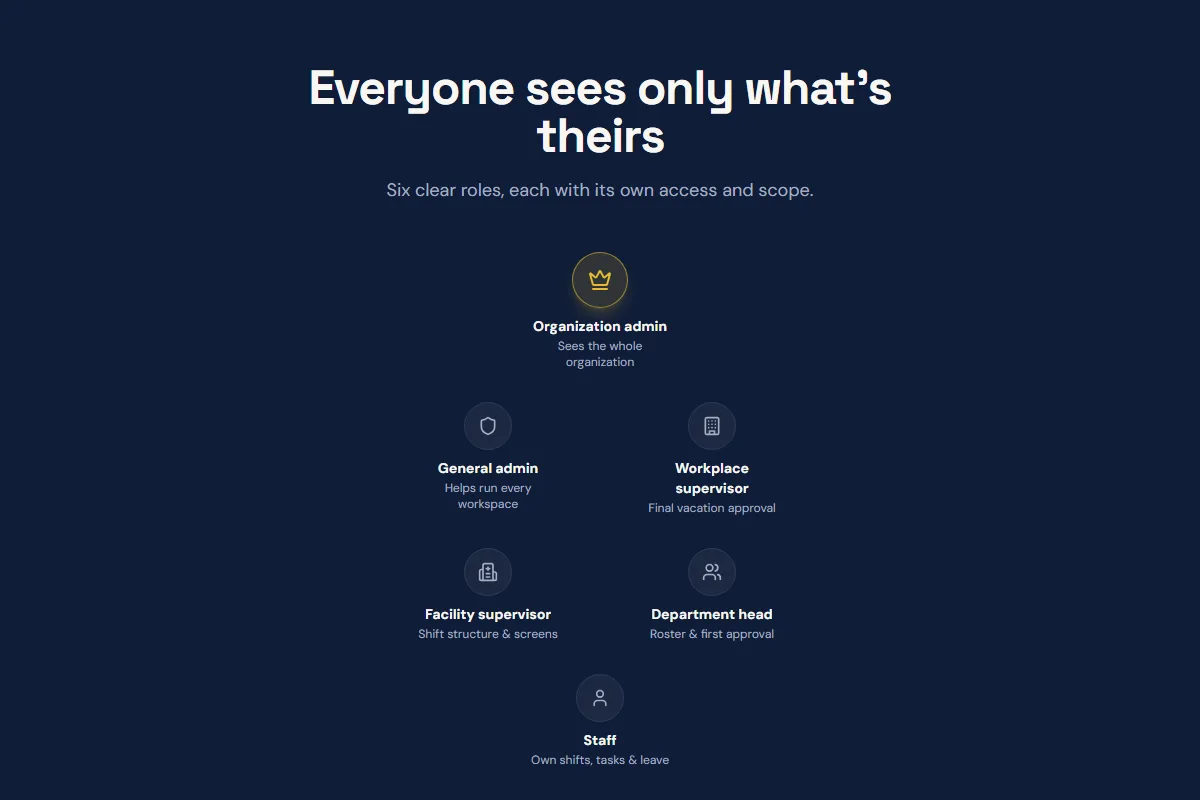
Every rule is checked on the server, and where the records sit in PostgreSQL, again inside the database through row-level security. Hiding a button is never the control. Planivo, the workforce planning platform we built in 2026, gives each of its six roles only its own part of the organization, and a role design of that kind is what your reviewers should ask any vendor to show them.
An audit trail your auditors can read
Each entry should say who acted, on which record, what the values were before and after, when, and in which session. Write into the scope that entries are append only: the app can add them, but no screen, the admin's included, can edit or delete one. You choose how long they are kept, and the scope should name a plain export format your security team's log tools can take in.
Planivo keeps an audit history of every change with who made it and when, and SpeedyPrint, a web to print store we built in 2026, keeps a status history on every order. Logs are also how the alerting failures that OWASP ranks ninth get caught: a burst of refused requests from one account should reach a person, not just sit in a file.
the identity provider decides who someone is; the app decides what that person may do, and records what they did
Screens staff use all day, accessible and fast
An internal app is used for hours at a stretch by people who did not choose it, some with a screen reader, a magnifier or only a keyboard. Two budgets keep it usable, an accessibility standard and a speed target, and both are written into the scope before design starts.
WCAG 2.2 AA as the accessibility target
WCAG 2.2 became a W3C Recommendation on 5 October 2023 and added nine success criteria. Six sit at levels A and AA, and they bite hardest on dense internal screens: focus that a sticky header must not hide, an alternative to every drag, click targets of at least 24 by 24 CSS pixels, sign-in without a memory test, no second request for data already given, and help in a consistent place.
For US federal agencies, Section 508 still names WCAG 2.0 Level A and AA. The W3C states that content conforming to WCAG 2.2 also conforms to 2.0 and 2.1, though 2.2 dropped one criterion, 4.1.1 Parsing, which a policy naming an older version may still ask you to test.
A scanner cannot judge everything WCAG asks, such as whether the focus order makes sense, so the scope should require a keyboard pass and a screen reader pass on every release, not only an automated report. Our free color contrast checker tests any pair of colors against the AA and AAA ratios before they reach a design file.
A speed budget for the heaviest screen
Google's Core Web Vitals count an Interaction to Next Paint of 200 milliseconds or less and a Largest Contentful Paint of 2.5 seconds as good, judged at the 75th percentile. We hold internal apps to the same budgets but measure them ourselves, because Chrome's public field data takes in only publicly discoverable pages, so an app behind single sign-on usually has none.
The budget is tested where your staff work: on the standard company laptop, over the VPN, with a realistic volume of records. Tables of tens of thousands of rows page, sort and filter on the server. Big exports run as background jobs and arrive as a download link. And the slowest screen is named in the scope, with its target beside it.
Browsers, networks and hosting inside a corporate estate
The supported browser list is agreed in writing from your own fleet, for example current Chrome, Edge and Firefox on managed laptops. Internet Explorer 11 left support for certain versions of Windows on 15 June 2022, and Microsoft supports IE mode in Edge through at least 2029, according to its lifecycle FAQ. A new app should never need IE mode; retiring an old app that does is often why the project exists.
Hosting goes where your policies say: your own AWS, Azure or Google Cloud account, held and paid for in your organization's name. Staff can reach the app through your VPN or an access proxy rather than the open internet; Entra's Application Proxy, for one, publishes on-premises apps for remote access. If the app will hold patient records, we sign a BAA and host under your cloud provider's BAA.
Corporate proxies and content filters break apps that pull scripts from a dozen outside domains, so the app serves its own scripts and fonts behind a strict Content Security Policy, which you can test with our free CSP validator. Releases go through your change process, with a staging copy that signs in through a test registration in your identity provider.
Builds of ours you can look at
We show client work only with the client's permission, and none of the builds below is presented as an identity provider integration. What they show is the rest of the job: roles, approvals, change history and the admin screens people work in.
Planivo, workforce planning for clinics and hospitals
We built the whole platform, the signed-in app and its website. Organizations use it to plan monthly shift rosters, send leave requests through three levels of approval with a check that flags two people of the same speciality away at once, assign tasks, run training sessions with attendance, get reminders before certifications expire, and put who is on duty on display screens.
SpeedyPrint's admin panel
For a South African web to print store, the admin side is an internal app in its own right: orders, products, templates and users run by three roles (customer, admin and production staff), with proofs, production files and a status history on each order. We built it in 2026 on Next.js 15, React, TypeScript and Supabase, with PayFast checkout and its payment webhooks.
Tools our own team works in
The live chat assistant on this site and the AI copilot inside our own CRM were both built in-house, so we run internal software ourselves, not only for clients. Our Clutch rating is 5.0 from 66 verified reviews (checked 13 October 2026). No results figure appears for any build here, because none has been published.
From intake call to a pilot team
IT, security and the process owner each sign something off, so all three are in the plan from the first week instead of meeting the app at launch.
- Intake call. Thirty minutes and free. When the project fits us, you get a written scope and quote within 48 hours.
- Discovery, two weeks, priced on its own. Who signs off what, the role matrix, your identity provider and its groups, every system the app reads or writes, the browser list, the speed budget, log retention and hosting. A threat model and a data-flow diagram land here too. It ends in a fixed bid, or advice to buy a product that already does the job.
- Architecture. Our CTO sets it, and each significant choice is written up with its reasons before engineers start.
- Build sprints of one to two weeks. Every week brings a recorded demo of working code and a note on what shipped and what slipped, all of it in a repository your organization owns.
- Review before launch. Our QA team checks each build first, before it reaches you. Your security team, or a firm you pick, tests the release candidate, and the accessibility pass runs against WCAG 2.2 AA.
- Pilot, then rollout. One team uses the app for real work first, with a tested way to roll back already in place, and the other teams follow.
- Handover or support. Architecture notes, runbooks and a knowledge transfer session for your own team, or a named team of ours on a monthly retainer.
After those two weeks of discovery, a focused first version usually needs 8 to 12 weeks of build, and a production platform 16 to 28. For a schedule worked out from your own hours and team size, try the free software project timeline calculator.
What enterprise web application development services cost
Custom software typically runs $40,000 to $150,000 for a focused first version, and $250,000 to $500,000 or more for complex enterprise platforms. Where one internal app lands depends on the six drivers in the table below. We print no rate card on this page; your fixed price comes at the end of discovery.
| Driver | Why it adds work | What to bring to the first call |
|---|---|---|
| Roles and permission rules | Each role adds screens to design and tests that prove access is right | Who uses the process today, and what each group may see and do |
| Identity setup | One provider with SCIM is quicker than several providers, or guest accounts for partners | Your provider, the protocol your identity team prefers, and the groups that already exist |
| Systems it reads or writes | Each integration needs its API limits checked, error handling and a test copy to build against | The systems involved and who owns each one |
| Records from the old app | Old data needs mapping, cleaning and a dry run before cutover | A sample export, and how many years of history must stay readable |
| Accessibility target | WCAG 2.2 AA adds design, build and test time to every screen, and an outside audit adds its own fee | The level your policy names, and whether procurement needs an audit report |
| Hosting and change rules | Your cloud account, private access and change board add setup and lead time | Your hosting policy, and how long a production change takes to approve |
Four ways to contract the build
- Fixed bid: one price against the document discovery produced, with any change priced and dated in writing first.
- Dedicated team: a lead, engineers and QA on your roadmap, billed monthly, normally for a quarter or longer.
- Engineers inside your team: people who pass your own interview and security checks, then work in your repository and standups.
- Retainer after launch: a named team for changes and incidents, the smallest being one senior engineer and one designer.
Before you compare quotes, read what moves a custom software budget. If a platform license is the alternative on the table, our free no-code vs custom calculator sets two to five years of each side by side.
The stack, the team and who owns the code
The default stack is picked so that your own developers, or whichever vendor follows us, can run it without us.
- Screens: Next.js and React, or Angular and Laravel when your estate already standardizes on them. Extra hands for a PHP estate come from our PHP developers on our staff.
- Server logic and integrations: Node.js, with Python for data work and AI features.
- Records and permissions: PostgreSQL, with row-level security enforcing the role matrix inside the database itself.
- Edge APIs and background jobs: Cloudflare Workers, which already run the booking and chat APIs of this site.
Our CTO, Divyansh Singh, owns the architecture of every build, and the engineers work from our Delhi and Lucknow offices on hours that overlap New York. Digital Heroes was founded in 2017 and is headquartered in New York, where the office answers the same business day between 9 AM and 6 PM Eastern. A production problem reported after hours is picked up within one to two hours.
Under our MSA, the code, designs and assets made for your project are assigned to you on full payment, and from the first sprint they sit in a repository and cloud account your organization controls. We keep only the libraries and tools we had before your project or built for reuse. Our US company is Digital Heroesco LLC, and your MSA names the entity you sign with.
What your security review will find written down
This page claims no SOC 2 report, ISO 27001 certificate or FedRAMP authorization, because we hold none we could name with its issuer and date. What we can hand your reviewers is evidence about the app itself:
- From discovery: the threat model, the data-flow diagram and a review of how secrets are handled.
- Encryption: TLS for every connection, and AES-256 at rest where records live in Supabase-hosted PostgreSQL, as Supabase documents.
- Credentials: API keys and service credentials kept on the server and never shipped to a browser.
- Signed-off designs: the role matrix, the audit log design and the browser list, approved before the build starts.
If your policy works from the OWASP Application Security Verification Standard, now at version 5.0.0, have the scope name the level the app must meet and list the requirements that apply, so the checklist is agreed during discovery rather than argued over at launch.
Confidentiality starts before the first document changes hands: once a scoping call is booked, a one-page mutual NDA is signed before we walk you through past client work.
Seven questions to put to any vendor
Send every firm on the shortlist the same seven questions and compare the written answers line by line. This page already gives ours.
- Which identity providers and protocols will the app support, and will it accept SCIM deprovisioning?
- Can we see a role matrix from a past build, with the client's details removed?
- Which WCAG version and level do you test against, and how, beyond a scanner?
- What is the speed budget for the heaviest screen, and where will you measure it?
- What does the audit log record, who can alter it, and how long is it kept?
- Whose cloud account and repository does the work live in during the build?
- What does the handover contain, and which legal entity signs the MSA?
When another option fits better
In our judgment, a low-code platform such as Microsoft Power Apps, Mendix or Retool is often enough for a small app with a few dozen users and simple rules, above all when the company already pays for the licenses. And we are the wrong firm if your contract requires every engineer to be in the US, or if the program needs several dozen engineers from the first week.
To write one brief that every vendor prices the same way, start from our free requirements document generator and add the role matrix and browser list to it.
Questions IT leads ask about internal web apps
What is an enterprise application developer?
An enterprise application developer builds and maintains the software employees use at work, rather than apps sold to consumers. On a web app that means connecting sign-in to the company's identity provider, turning role rules and approvals into code, integrating with the systems of record, writing tests that prove access is right, and keeping screens usable for people who spend all day in them.
How much does it cost to pay someone to develop an app?
For custom software, a focused first version typically costs $40,000 to $150,000, and complex enterprise platforms $250,000 to $500,000 or more. Hourly rates depend on where the team sits: in GoodFirms' 2026 cost survey, $20 to $50 an hour was the commonest band, while enterprise work from US, Canadian and Western European teams ran $100 to $250 an hour.
What counts as an enterprise web application?
It is a browser-based application that an organization's staff, and sometimes its partners, use to run a process: approvals, cases, records or reporting. The setting is what makes it enterprise: sign-in through the company's identity provider, permissions by role for large numbers of people, an audit trail, and a life inside the browsers, networks and change rules the company's IT team manages.
How is an enterprise web app different from a regular web app?
A regular web app usually keeps its own accounts and serves anyone who signs up. An enterprise one trusts the company directory for who someone is, takes roles from directory groups, records every change for audit, meets the accessibility standard the employer is bound by, and runs inside browsers and networks that IT manages. Most of the extra effort goes into those requirements, not into the screens.
How long does an internal web app take to build?
With us, discovery takes two weeks; after it, a focused first version usually needs 8 to 12 weeks of build and a production platform 16 to 28. Identity and security reviews on your side can add lead time of their own, so book the reviewers' time during discovery rather than in the final sprint.
Can you add single sign-on and roles to an app we already run?
Usually, as long as the code can be read. A review of the repository comes first. The scope then adds sign-in through your identity provider, moves permission checks to the server and adds an audit log, in that order, while the app stays in use. If the code turns out to be past saving, the review says so before you pay for either path.
Which identity providers can the app sign in with?
Any provider that speaks SAML 2.0 or OpenID Connect, and Okta and Microsoft Entra ID support both. The scope should name the protocol your identity team prefers and how its groups map to the app's roles, and say whether the app needs a SCIM endpoint so the provider can create and deactivate accounts on its own.
Should we build on a low-code platform such as Power Apps instead?
Sometimes. If the app is small, the rules are simple and the company already licenses the platform, low-code is faster and cheaper to start. Custom code earns its cost when the role rules are complex, screens carry large volumes of data, accessibility and speed have to be tuned screen by screen, or you want to own the code outright instead of renting the platform.
Last reviewed .
Bring the process, leave with a written scope
Tell us which process the app should run, who will use it and which identity provider you have. After a 30-minute call you get a written scope within 48 hours, and a fixed price once discovery ends. Book a call with a web app engineer.
Why work with Digital Heroes









115 people across five studios in New York, Delhi, London, Sydney and Lucknow, shipping ecommerce, web, software and mobile work for founder-led brands. Senior engineers only, no account-manager relay, and the same team from kickoff to launch.
- Shopify Select Partner, as listed in the Shopify Partner Directory
- Tier 1 registered supplier on the United Nations Global Marketplace, which requires audited company documentation
- Top Rated Plus on Upwork, the bracket for the top 3% of talent by client outcomes
- 397 public five-star-weighted reviews across four Fiverr gigs, from clients in 36 countries
- DUNS verified business, No. 650878346, so procurement can check us before signing
- Listed by Clutch in Top 1000 Global B2B Companies and Top Web Designers 2024
- Verified profiles on GoodFirms, DesignRush, Digital.com, AppFutura and TopDevelopers
- 2,000+ brands built across 40+ countries, with $50M+ in client revenue scaled

More from Divyansh.
Chief Technology Officer · Lucknow · 50 posts on the site
Published .


