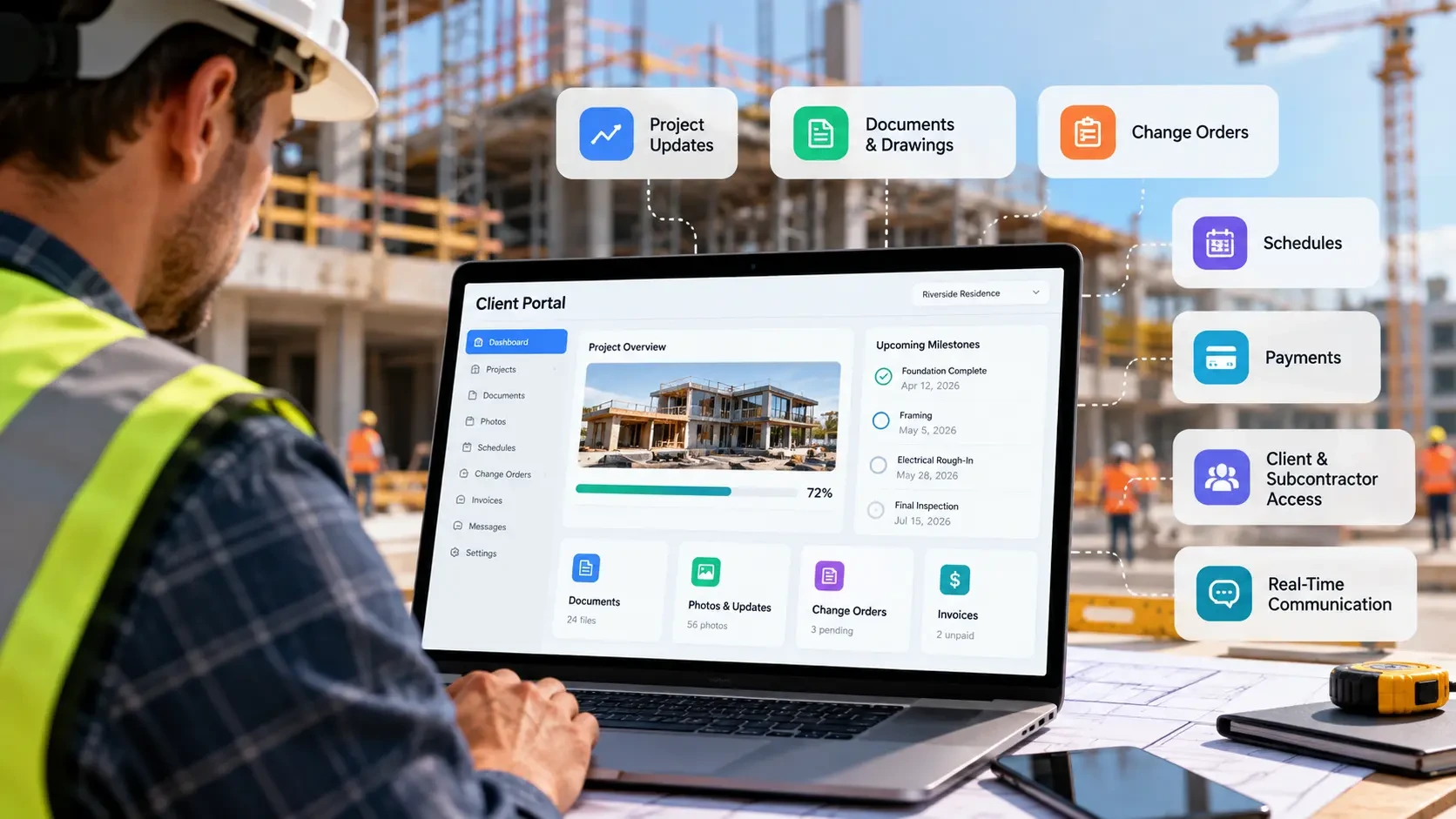
Construction companies often reach a point where project updates, documents, budgets, change orders and payment information are spread across email, spreadsheets and separate software systems. A construction client portal can bring the client- and subcontractor-facing parts of that communication into one controlled digital experience.
But “client portal” can mean very different things. A simple portal might provide project updates and document access, while a more advanced system can handle change-order approvals, payments, scheduling, field information and integrations with ERP or accounting software.
That difference has a major impact on development cost. In 2026, a focused construction client portal can start around $25,000, while a broader construction platform with integrations and internal operations can reach several hundred thousand dollars.
This guide explains what construction client portal software should include, what it costs to build, what drives the price, when buying packaged software makes more sense, when custom development becomes worthwhile, and how to evaluate the total cost before committing to a project.
What Is Construction Client Portal Software?
Construction client portal software is a web or mobile system that gives project stakeholders controlled access to information and workflows related to a construction project.
Instead of relying on repeated status calls, email attachments and scattered documents, a portal can give clients or subcontractors a single place to view relevant project information, submit information and track important actions.
The exact scope varies considerably. Some portals focus primarily on client communication and document sharing, while others become connected to project management, financial, scheduling or field-operations systems.
What Types of Construction Portals Are There?
The term “construction portal” can describe several different systems. Identifying the users and workflows first is important because the difference between a simple client portal and an internal construction platform can dramatically change development cost.
1. Client Portal
A homeowner or project-owner-facing portal can provide project updates, photos, schedules, documents, budgets, change orders, selections, invoices and payment information. The goal is to give the client visibility without exposing internal systems or information that does not belong to them.
2. Subcontractor Portal
A subcontractor portal can support pay-application submissions, compliance documents, RFIs, drawings, project schedules, scope information and approval status. Permissions should be designed so each trade can access the projects and information relevant to its work.
3. Internal Operations Portal
An internal operations portal is designed for project managers, administrators and field teams. It may include scheduling, cost tracking, crew coordination, punch lists, reporting and other operational workflows. Once a project reaches this level of functionality, it is closer to a construction management platform than a simple client portal.
Construction Client Portal Software: Essential Features
A construction client portal should be designed around the information clients, subcontractors and project teams actually need to exchange. The feature list can grow quickly, but the core system should make project information easier to access, approve and track.
A real-world example is BuildTools' construction client portal, which gives clients controlled access to project milestones, approvals, photos, selections, documents and project updates.
Project Updates and Daily Logs
Clients should be able to see meaningful project progress without requesting a separate status update. Depending on the workflow, this can include daily notes, progress photos, completed milestones, upcoming activities and important project notices.
Budget and Change-Order Visibility
A portal can show approved budget information, change orders, revised amounts and approval status. For clients, this creates visibility into how scope changes affect the project. For internal teams, it can provide a controlled workflow for submitting and approving changes.
Document Management
Contracts, drawings, permits, selections, warranties, invoices and other project documents should have a clear location and permission structure. Version control and searchable records become increasingly important as the number of projects and stakeholders grows.
Billing and Payment Status
Client-facing portals can display invoices, payment history and outstanding balances. Subcontractor portals can instead focus on pay applications, approval status and supporting documentation.
Role-Based Access
Different users should see different information. A homeowner may need project updates and invoices, while a subcontractor may need drawings, RFIs and compliance documents. Internal project managers may require access to budgets, schedules and operational information.
Mobile-Friendly Field Access
If project information is captured from a jobsite, the interface should work well on phones and tablets. For workflows that depend on field connectivity, offline-tolerant data capture can allow information to be recorded when a connection is unavailable and synchronized later.
Scheduling and Milestones
More advanced portals can expose project schedules, milestone dates and upcoming activities without exposing internal information that clients do not need.
RFIs, Selections and Approvals
Depending on the project type, the portal can support requests for information, material selections, approval workflows, digital acknowledgements and other decisions that would otherwise move through email.
Notifications and Audit Trails
Important events such as document uploads, change-order approvals, payment updates and project milestones can trigger notifications. Audit trails can record who submitted, approved or changed important information.
How Much Does Construction Client Portal Software Cost?
Construction client portal development does not have one standard market price because the term “portal” can describe anything from a simple document-and-status interface to a connected construction management platform.
For planning purposes, a focused client or subcontractor portal can fall around $25,000–$80,000, while a portal combined with project-management functionality can reach $80,000–$150,000. Broader construction platforms with field operations, subcontractor management and significant integrations can reach $150,000–$300,000+.
These are planning ranges, not fixed industry prices or quotes. The actual cost depends on user roles, workflow complexity, integrations, security requirements, mobile functionality, data migration and the amount of custom functionality required.
| Scope | Planning Cost | Typical Timeline | Typical Use |
|---|---|---|---|
| Standalone client or subcontractor portal | $25,000–$80,000 | 6–14 weeks | Project communication, documents and visibility |
| Portal + basic project management | $80,000–$150,000 | 4–6 months | Scheduling, budgets and broader project workflows |
| Full construction platform | $150,000–$300,000 | 6–10 months | Field operations, subcontractors and integrations |
| Platform + BIM/ERP integration | $300,000–$500,000+ | 10–16 months | Enterprise and multi-entity operations |
Ongoing maintenance should also be included in the budget. A planning allowance of roughly 15%–25% of the original build cost per year can cover areas such as security updates, infrastructure, browser compatibility, monitoring, bug fixes and iterative improvements. The appropriate amount depends on the system and service agreement.
What Drives Construction Client Portal Development Cost?
Two portals with similar-looking dashboards can have very different development costs because the complexity is usually behind the interface.
The main cost drivers are:
- Number of user roles: Clients, subcontractors, project managers, administrators and field workers may all require different permissions.
- Workflow complexity: Simple viewing is cheaper than multi-step submissions, approvals, escalations and automated notifications.
- Integrations: Accounting, ERP, scheduling, CRM, payment and document systems can significantly increase development effort.
- Mobile and offline functionality: Field workflows require additional synchronization, storage and testing considerations.
- Data migration: Moving historical projects, documents, users or financial information into the new platform adds scope.
- Reporting: Standard dashboards are simpler than custom portfolio reporting, forecasting and job-cost analysis.
- Security: Authentication, role-based access, audit logs, backups and secure integrations need to be designed into the system.
- Custom UI/UX: A branded client experience with different interfaces for different stakeholder groups requires additional design and development.
The biggest cost-control decision is therefore not choosing a programming language. It is deciding which workflows belong in the first release and which can wait.
Construction Client Portal Cost: Buy vs. Custom Build
Building custom software is not automatically the cheaper option. Packaged construction platforms can already provide many common workflows, including scheduling, daily logs, change orders, documents, client portals and payments. For example, Buildertrend's construction communication tools include client and subcontractor portals, project communication, document access and project updates.
The decision changes when the packaged platform no longer fits the company's workflow, integration requirements or operating model.
| Consideration | Buy Packaged Software | Consider Custom Development |
|---|---|---|
| Workflow | Standard construction processes | Highly specific workflows |
| Launch speed | Usually faster | Longer implementation |
| Upfront cost | Lower | Higher |
| Customization | Limited to available functionality | Built around your requirements |
| Integrations | Depends on available APIs/connectors | Designed around your systems |
| Pricing | Subscription or seat-based | Development + maintenance |
| Ownership | Vendor-controlled platform | Company can own code and infrastructure |
| Best fit | Standard operations | Differentiated or complex operations |
If your requirements are expanding beyond a client-facing portal into scheduling, field operations, job costing and broader project controls, see our custom construction management software guide for the larger platform cost and scope.
The existing Digital Heroes construction guide currently places broader custom construction-management projects in the $80,000–$500,000+ range depending on scope and integrations.
For companies specifically comparing construction safety and site-operation platforms, our HammerTech alternatives guide covers the separate question of staying with a packaged platform, changing products or building a narrower custom workflow.
What Is the Total Cost of Ownership of Construction Software?
The purchase price is only one part of the cost.
For packaged software, total cost can include:
- Subscription or user fees
- Implementation and onboarding
- Training
- Data migration
- Integration charges
- Premium modules
- Additional users
- Support plans
- Annual price increases
- Internal administration time
Current construction-software pricing research also highlights implementation, training, migration, integrations, seat growth and renewal increases as costs that can materially change the real software bill. PlanRadar's construction software pricing guide provides additional detail on these cost considerations.
For custom software, the calculation changes. Instead of a recurring platform subscription, the business needs to account for:
- Initial development
- Hosting and infrastructure
- Security updates
- Maintenance
- Support
- Future features
- Integration maintenance
- Internal ownership and administration
A useful comparison is therefore not “What is the monthly price?” but “What will this system cost us over three to five years?”
What Should a Construction Client Portal Integrate With?
The portal should not become another isolated database that forces employees to enter the same information twice.
Depending on the company, useful integrations can include:
- Accounting and ERP systems
- Construction project-management software
- Scheduling systems
- Estimating software
- CRM platforms
- Payment processors
- Document-management systems
- Email and messaging systems
- Identity and authentication providers
- Business-intelligence and reporting tools
The integration strategy should be decided before development begins. A portal that displays information from another system may require a simpler connection than one that must continuously synchronize budgets, schedules, payments and project records in both directions.
If the project requires a broader software system rather than a standalone portal, custom software development can cover custom workflows, integrations, dashboards and platform infrastructure. Digital Heroes currently describes its software-development practice as covering custom internal software, ERP integrations, data pipelines and dashboards.
Security Requirements for Construction Client Portals
Construction portals can contain contracts, financial information, drawings, personal information and commercially sensitive project data. Security therefore needs to be part of the architecture rather than something added immediately before launch.
A production portal should consider:
- Role-based access control
- Secure authentication
- Multi-factor authentication where appropriate
- Encryption in transit and at rest
- Audit logging
- Least-privilege permissions
- Secure API authentication
- Backup and recovery procedures
- Session management
- Monitoring and security alerts
- Controlled access to project documents
The exact security requirements depend on the information being stored, the organizations using the platform, contractual requirements and the systems connected to it.
Who Needs Construction Client Portal Software?
A construction client portal can be useful when multiple stakeholders repeatedly need access to the same project information.
Typical users include:
General Contractors
GCs can use portals to provide clients and subcontractors with controlled access to project information while keeping internal project-management functions separate.
Custom Home Builders
Homebuilders can use client-facing portals for progress updates, selections, change orders, documents, invoices and payment information.
Commercial Contractors
Commercial projects often involve multiple stakeholders, making document access, approvals, reporting and permissions particularly important.
Specialty Contractors
Specialty trades may need subcontractor-facing workflows for RFIs, compliance documents, schedules, pay applications and project communication.
Multi-Entity Construction Companies
Companies managing several entities, business units or project portfolios may eventually need consolidated reporting and integrations that go beyond a basic client portal.
How to Calculate Whether a Construction Client Portal Is Worth the Investment
The business case should start with the work the portal is expected to remove or reduce.
Estimate how much time your team currently spends on:
- Repeating project-status updates
- Searching for documents
- Chasing approvals
- Entering the same data into multiple systems
- Responding to routine payment questions
- Reconciling spreadsheets
- Following up on missing subcontractor information
- Preparing recurring reports
Then estimate the financial impact of reducing that work.
A portal does not need to eliminate every communication problem to create value. It can be justified when the combination of saved staff time, faster approvals, better information visibility and reduced administrative work produces a meaningful return relative to the total cost of ownership.
For example, if the main problem is simply that clients repeatedly ask for project updates, a focused portal may be appropriate. If the problem includes scheduling, job costing, field reporting, procurement and accounting synchronization, the project is no longer just a client portal and should be budgeted accordingly.
How Long Does Construction Client Portal Development Take?
A focused construction client or subcontractor portal can typically take around 6–14 weeks when the scope is clearly defined.
A larger platform with project-management functionality can take several months, while systems involving ERP, BIM, accounting synchronization or multiple operational workflows can take 6–16 months or more depending on scope.
A typical development process includes:
- Discovery and requirements
- Information architecture and UX
- UI design
- Technical architecture
- Core development
- Integration development
- Testing and security review
- Data migration
- User acceptance testing
- Launch and training
The safest way to control the timeline is to define a first release around the highest-value workflow rather than trying to reproduce an entire construction-management platform immediately.
How to Choose a Construction Client Portal Development Company
The development company should understand both the software requirements and the construction workflow behind them.
Before signing, ask:
1. What would you remove from the first release?
A good discovery process should identify what does not belong in version one. A vendor that adds every requested feature without challenging scope can create an unnecessarily expensive first release.
2. How will field users work without reliable connectivity?
If supervisors or crews will capture information from jobsites, ask how offline-tolerant workflows and synchronization will work.
3. How will we export our data?
Project history should remain portable. Ask for a documented export strategy before development begins.
4. Who owns the source code?
Confirm who owns the repository, source code, database structure, documentation, designs and infrastructure accounts.
5. What happens after launch?
Ask for a written maintenance and support plan covering security updates, bugs, infrastructure, monitoring and future development.
6. Can you provide a fixed scope before the full build?
A paid discovery phase can produce a written specification, architecture, delivery plan and clearer development estimate before the larger build begins.
Who Owns the Code and Data?
Ownership should be settled in the contract before development starts.
For a custom construction portal, confirm who owns:
- Source code
- Git repository
- Database
- Database schema
- UI designs
- Technical documentation
- APIs and integration code
- Cloud infrastructure
- Domain and application credentials
- Project data
- Backups and exported records
The safest arrangement for a company commissioning custom software is clear contractual ownership and a practical handover process. The business should know how it would continue operating the system if the development relationship ended.
If the portal eventually expands into accounting, procurement, inventory, finance or broader operational workflows, ERP development can become the next stage rather than continuing to stretch a simple portal beyond its original purpose. Digital Heroes currently lists ERP development alongside its software-development services.
Frequently Asked Questions
How much does construction client portal software cost?
A focused client or subcontractor portal can fall around $25,000–$80,000 as a planning range. Costs can increase substantially when scheduling, project management, field operations, ERP integrations or complex workflows are included.
Is it cheaper to buy Buildertrend or Procore than build custom software?
For companies with standard workflows, packaged construction software can be less expensive and faster to deploy than custom development. Custom development becomes more relevant when the company's workflows, integrations or ownership requirements are not well served by the available platforms.
What is the difference between a client portal and construction management software?
A client portal primarily provides controlled access to project information and client- or subcontractor-facing workflows. A full construction-management platform can also include scheduling, job costing, field operations, procurement, reporting and internal project controls.
How long does it take to build a construction client portal?
A focused portal can take approximately 6–14 weeks. More advanced platforms can take several months, particularly when they require integrations, field functionality or extensive data migration.
Should a construction portal work offline?
If field employees need to capture information from locations with unreliable connectivity, offline-tolerant functionality can be important. The requirement should be based on the actual jobsite workflow rather than treated as a universal requirement for every portal.
Can a construction portal integrate with an ERP or accounting system?
Yes, provided the existing system exposes a suitable API, connector or other integration method. The complexity depends on whether the portal only reads information or needs two-way synchronization.
What features should a construction client portal include?
Common features include project updates, documents, photos, budgets, change orders, invoices, payments, approvals, notifications, role-based access and messaging. More advanced systems may add scheduling, RFIs, selections, reporting and field capture.
What is the total cost of owning construction software?
Total cost can include subscriptions, implementation, training, migration, integrations, support and internal administration for packaged software. Custom software adds development, hosting, maintenance, security and future enhancement costs.
How do I know whether to build or buy construction software?
Start by documenting the workflows you need. If an existing product covers the majority of them without expensive workarounds, buying may be appropriate. If the missing workflows are operationally important and cannot be integrated or configured effectively, custom development may deserve consideration.
Final Takeaway: Start With the Workflow, Not the Software
Construction client portal software can range from a relatively focused $25,000–$80,000 project to a much larger construction platform costing several hundred thousand dollars.
The difference is rarely the word “portal” itself. It is what the portal is expected to do.
If the requirement is primarily project updates, documents, approvals and payment visibility, a focused portal can keep the project relatively contained. If the requirement expands into scheduling, job costing, field operations, subcontractor management and ERP integration, it should be planned as a broader software platform.
Before choosing between buying and building, document the workflows, users, integrations, data requirements and expected three-to-five-year cost. That gives you a much clearer basis for deciding what the software should actually become.
Planning a Construction Client Portal?
If your current process relies on spreadsheets, email chains and disconnected construction systems, the first step is defining which workflow the portal should actually solve.
Talk to Digital Heroes about your construction software project and turn the requirements into a defined scope, timeline and development plan.
Sources & Methodology
The development-cost ranges in this guide are planning estimates rather than fixed market prices or vendor quotations. Actual software costs vary according to scope, geography, development team, integrations, security requirements, data migration, mobile functionality and ongoing support.
The construction communication figures referenced in this article come from FMI research, which reports that poor project data and communication account for 48% of construction rework in the US and estimates the resulting annual cost at approximately $31.3 billion.
Current construction-software pricing research was also reviewed to account for implementation, training, migration, integrations, seat growth and other costs that can affect the total cost of packaged software.