Building custom software, step by step.
What happens between "we need our own system" and a team using it every day: the three decisions to settle first, the eight steps of the build, who should do the work, what it costs, how long it takes, and the seven places projects usually go wrong.
On this page
Building custom software means turning one written problem into a working system in a fixed order: decide whether to build at all, run a short discovery, cut the first version down to one workflow, design it, build it in sprints of one to two weeks, test it, launch it in stages and keep it running. With us, a focused first version costs $40,000 to $150,000 and an MVP takes 8 to 12 weeks to build.
- 01The order matters more than the method. Each step hands the next one something you can check, and a skipped step comes back as cost, usually during testing.
- 02The first version should do one job for one group of people, end to end. Long feature lists that nobody ranked are where overruns start.
- 03Choose who builds it by who will run it in two years, not by the lowest hourly rate.
- 04Owning it costs money every year. GoodFirms' 2026 survey finds firms spend an average of 10 to 20 percent a year on upkeep after launch.
- 05Buy when an existing product already handles the process the way you would design it yourself. A build pays when the way you work is the point.
What counts as custom software.
Custom software is written for one organization's way of working and belongs to that organization, unlike a packaged product sold to thousands of customers on the same terms. It rarely means every line is new. Most custom systems rent common parts such as sign-in, payments and email, and are custom only where the rules belong to the business.
Sorted by who uses it, most builds fall into five groups. All five follow the same eight steps further down; what changes is who you interview in discovery and how much of the work is connections rather than screens.
- For your staff. Rosters, approvals, job tracking and internal admin: the work that spreadsheets and email threads carry today. Planivo, in the worked examples below, is one.
- For your customers. Portals, booking and ordering, and stores with steps no template handles, such as the browser design editor in SpeedyPrint.
- Between your other tools. A layer that moves orders, invoices or records between systems you already pay for, so nobody copies data from one screen to another by hand.
- On a phone. Apps for field staff or for customers. For AirTrainr, we built the athlete and trainer mobile apps, using React Native and Expo with a Supabase back end.
- To sell. A SaaS product, where the software is the business itself. It follows the same steps with billing and multi-customer accounts added, and our SaaS development cost guide covers how it is priced.
Three decisions that come before any code.
Most projects that go badly were set up badly before a developer was hired. Three questions settle much of what follows, and each one has a wrong answer that sounds reasonable in a meeting.
1. Should this be built at all?
Write one paragraph naming what the software must do that no product you have trialled can do. If the paragraph is about features, keep looking for a product, because someone probably sells it. If it is about how your business works, such as a pricing rule, an approval chain or a hand off between two teams, you have a real case for building.
Our custom software cost guide works through a three year example of seat fees against a build, and the free build vs buy calculator runs a five year total cost on your own seat count and prices.
2. What is the smallest version worth using?
Pick one workflow and one group of users, and make that work from start to finish before anything else is added. A staff scheduling tool might begin with rosters and leave requests for one department, with reports and a phone app later. Real people can then use it within months, and what they actually do with it decides the second version better than any workshop.
3. Who will own it after launch?
Someone will fix bugs, update libraries, renew certificates and explain why a report looks wrong. Decide now whether that is your own hire, the team that built it, or a new team you hand over to, because the answer changes how the build is documented and where the code lives. If you plan to run it yourself one day, put the code repositories and cloud accounts in your company's name from the first week.
Off the shelf, no-code or custom: what each gets you.
There are three ways to get software that runs a process, and they trade speed for fit. The table compares them on the questions buyers ask most.
| Question | Packaged product | No-code or low-code | Custom build |
|---|---|---|---|
| Time to first use | Days, once accounts are set up | Weeks, for a simple app | Months; an MVP takes 8 to 12 weeks to build with us |
| Money up front | Little; you pay a subscription | Platform fees plus the time to build | The most; $40,000 to $150,000 for a focused first version with us |
| Fit to your process | You change your process to suit it | Fine for simple flows; complex rules strain it | Built around how you work |
| Who owns it | The vendor; you rent access | Your app lives on the platform and usually cannot move off it | You do, once paid for, if the contract says so |
| Connections to other tools | Whatever the vendor supports | The platform's connectors | Anything with an API, on your rules |
| Cost each year | Seat fees that rise with every hire | Fees that rise with users or usage | Hosting, plus upkeep of 10 to 20 percent of the build |
| Best when | The process is standard: accounting, email, payroll | A small team needs an internal tool this month | The process is the business, or tools must act as one |
Plenty of good systems mix all three: a packaged accounting product, a no-code screen for a small admin team, and custom code only where the rules are yours. The free no-code vs custom calculator prices a platform against a build over two to five years, and our comparison of SaaS and custom software takes the wider argument.
The eight steps of building custom software.
Firms name these steps differently, but the order holds. Each one ends in something on paper or on screen that you can check. When a step ends in nothing you can check, it has not ended, whatever the status report says.
1. Write the problem down
Describe the work as it happens today: who does it, which tools and spreadsheets they touch, where it stalls and how many hours it takes. Add one measure you could check six months after launch, such as days to approve a request or orders handled per person. A builder can price a written problem far more accurately than a list of features.
You should hold: a brief of one or two pages. The free requirements document generator builds one from your answers.
2. Run a short discovery
Discovery is a short paid phase: the builder interviews the people who will use the system, maps every tool it must connect to and lists what could go wrong. With us it takes two weeks, is priced apart from the build, and ends in one of two documents: a fixed price for the build, or a written case for buying an existing product instead. It is the cheapest point to learn the project is harder, or easier, than it looked.
You should hold: written requirements, a map of the systems involved, a list of risks, and a price or a reason not to build.
3. Cut the first version to size
Rank every feature by how much it matters to the first users and how much effort it takes, then draw a line. Above the line is the first release; below it is a list you revisit once real usage data exists. Write each feature as a user story with acceptance criteria, so everyone agrees what finished means before anyone writes code.
You should hold: a ranked backlog and stories with acceptance criteria. The RICE score calculator and the user story generator help with each.
4. Design the flows, screens and data
Sketch the main journeys before anyone picks colours: how a request is created, approved and closed, and what each role sees along the way. Design the data model at the same time, because records and the links between them are much harder to change later than a layout. Ask to see each screen with no data yet, with an error, and with a list thousands of rows long.
You should hold: clickable wireframes of the main journeys and a diagram of the data. Our guide to the UX design process covers this step in depth.
5. Choose what to build and what to rent
Sign-in, payments, email and file storage are usually better bought as services than written from scratch, which leaves the budget for the rules that are yours. Choose a widely used stack that your future team can hire for, rather than the newest one. For web apps we usually build on Next.js and React with PostgreSQL for the records, and our CTO approves each build's architecture before engineering begins.
You should hold: a short note on what was chosen and why. The free tech stack selector suggests a starting stack from four questions.
6. Build in short sprints
The build runs in sprints lasting one or two weeks. Each sprint should close with a demo of software that works, not a slide about progress. Watch the demo, try the build yourself and say what is wrong while it is still cheap to change. Each new idea is written up as a change request stating the extra cost and the new date, so the scope only grows when someone has chosen to grow it.
You should hold: a recorded demo every week and a short written note of what was finished and what moved to the next sprint. With us, a week that ends without that demo is not billed.
7. Test and secure it
Testing runs through every sprint, not just the last one: automated tests for the rules that matter, a tester checking each build before you see it, and a final round with real users doing real tasks. Check the build against the OWASP Top 10 web application risks, enforce permissions in the database rather than by hiding buttons, and rehearse any data migration on a copy first.
You should hold: a test report, a list of issues fixed and accepted, and a migration that has already run once on copied data.
8. Launch in stages, then run it
Before the first release, rehearse how you would undo it, so a bad release can be reversed rather than patched in a hurry. Larger systems go live one module or one team at a time, so a problem reaches ten people instead of everyone. After launch the job changes from building to running: monitoring, bug fixes, library updates, and the second version that real use will ask for.
You should hold: logins to every account, documentation and runbooks, and a named person or team who answers for the system from launch day.
In-house, freelancer or agency: who should build it.
The right builder depends less on the hourly rate than on two things: how much of your own time you can give to managing the work, and who will run the system once it is live.
| Option | You manage | Strength | Main risk | Suits |
|---|---|---|---|---|
| Your own hires | Hiring, the roadmap and every technical decision | The knowledge stays in the company | Months to hire, and one or two people rarely cover design, back end, testing and hosting | A product that is the business and needs a team for years |
| A freelancer | Requirements, testing and the schedule | Low cost for a small, well defined job | One person is a single point of failure for illness, other clients and knowledge | A contained tool, one integration or a prototype |
| An agency or studio | Decisions and sign off; the agency runs the team | Design, engineering and testing from the first week | Dependence on the agency, unless the contract hands you the code and documents | A first version that needs several skills at once |
| Agency first, your team later | Hiring your own people while the build runs | Speed now, ownership later | The handover, if nobody planned it from the start | Companies that want their own team within a year or two |
If you choose an agency, ask who answers for the result and whether that person joins your calls. Our focused builds usually run with three to five people: one tech lead who answers for the result, a designer, and one or two developers, with the same small group covering testing and weekly updates. How we run that kind of engagement is set out on our custom software outsourcing page.
We do not take on work below one senior engineer and one designer. For anything smaller, a freelancer or a smaller studio is the better buy, and we say so on the call.
To compare the options on your own hours and rates, the in-house vs agency cost calculator adds hiring and overhead to the in-house figure, which is the cost most comparisons leave out. If you already have a team and only need more hands, hiring software developers into it is a different model with its own page.
What a build costs and how the calendar runs.
For a focused first version of custom software, our price is $40,000 to $150,000. Complex enterprise platforms run $250,000 to $500,000 or more, and a SaaS MVP is usually $30,000 to $80,000. Where a build lands inside a band depends mostly on integrations, user roles, the data that has to move, compliance, and how clearly the process is mapped before work starts.
Our guide to the cost of custom software development takes those drivers one at a time, along with the four common ways builds are priced. The table below covers the other half: the schedule, phase by phase.
| Phase | How long | What you hold at the end |
|---|---|---|
| Scoping call | A 30-minute call at no cost, then a written scope and quote in 48 hours | A scope you can set beside other quotes |
| Discovery | Two weeks, priced on its own | A fixed price for the build, or advice to buy |
| MVP build | 8 to 12 weeks | A first version real users can work in |
| Production platform | 16 to 28 weeks | A system ready for the whole organization |
| After launch | Monthly, on a retainer | Fixes, updates and the next features, or a handover pack |
Upkeep is the cost buyers most often leave out. GoodFirms' 2026 cost survey finds that companies spend an average of 10 to 20 percent a year on maintenance after launch, and that scope creep, where it happens, adds 10 to 25 percent to the cost. On a $100,000 build, that is $10,000 to $20,000 a year to keep the system patched and working, with new features on top.
For figures on your own numbers, the free software development cost calculator multiplies estimated hours by a blended rate, the project timeline calculator converts build hours and team size into a schedule in weeks, and the maintenance cost calculator estimates the yearly bill as a share of the build.
Seven ways builds go wrong, and the guard for each.
The code is seldom what sinks a build. The usual causes are below, each with an early sign you can watch for and a guard you can write into the plan or the contract before work starts.
| Risk | Early sign | Guard |
|---|---|---|
| Building the wrong thing | Nobody who will use it has been interviewed | Interview users in discovery, then put the first version in front of them |
| Scope that grows quietly | Small additions agreed on calls, with nothing written down | Every addition priced and dated in writing before work on it starts |
| One hard integration, untested | The plan says "connect to the ERP" and nothing more | Prove the hardest connection in the first sprint, not the last |
| Data migration left to the end | Nobody has opened the old data yet | Clean the data and migrate a copy while the build runs |
| Security added late | Permissions handled by hiding buttons on screen | A threat model in discovery and permission checks in the database |
| No decision maker on your side | Questions wait days for an answer | Name one person who can decide within a day, every week |
| Locked to the builder | Code in the vendor's accounts and no documents | Repositories in your name and a handover pack written into the contract |
The free software project risk assessment rates six factors and names the one to fix first. On our builds that last guard is the default: your company opens the repositories and cloud accounts in its own name, and our MSA transfers ownership of the project's code to you on full payment.
Where no-code tools and AI coding assistants fit.
No-code platforms such as Bubble, Glide and Microsoft Power Apps let someone who does not program assemble a simple app on screen, and tools like Airtable and Retool cover a lot of internal admin work. They are a sound first step when a small team needs a tool this month. They strain when the rules get complex, when many users need different permissions, or when the platform's pricing stops matching how you grow.
AI coding assistants, ChatGPT among them, can now write working code for a small app or a prototype from a plain description. What they do not do is decide what the software should do, confirm the permissions are right, run the hosting or answer for the result when something fails. Treat what they produce as a draft that an engineer reads, tests and takes responsibility for.
AI also earns a place inside the software, wherever a narrow task repeats, such as routing incoming requests to the right queue or drafting a reply from your own records for a person to check. We built this site's chat assistant and our own CRM copilot in house. Before any model is connected to a system of yours, agree two limits: it sees only records the signed-in user could open anyway, and it edits nothing without a person signing off.
Two builds, read against the steps.
Two systems we built in 2026 show where the custom part of custom software usually sits. Neither client has published outcome numbers, so this section describes what was built and stops there.
Planivo: staff planning for clinics and hospitals
We built Planivo end to end: both the app that staff log into and the public website in front of it. The parts anyone would expect are there: rosters planned a month at a time, task lists, training sessions that record who attended, alerts before a certification lapses, and display screens showing who is on duty.
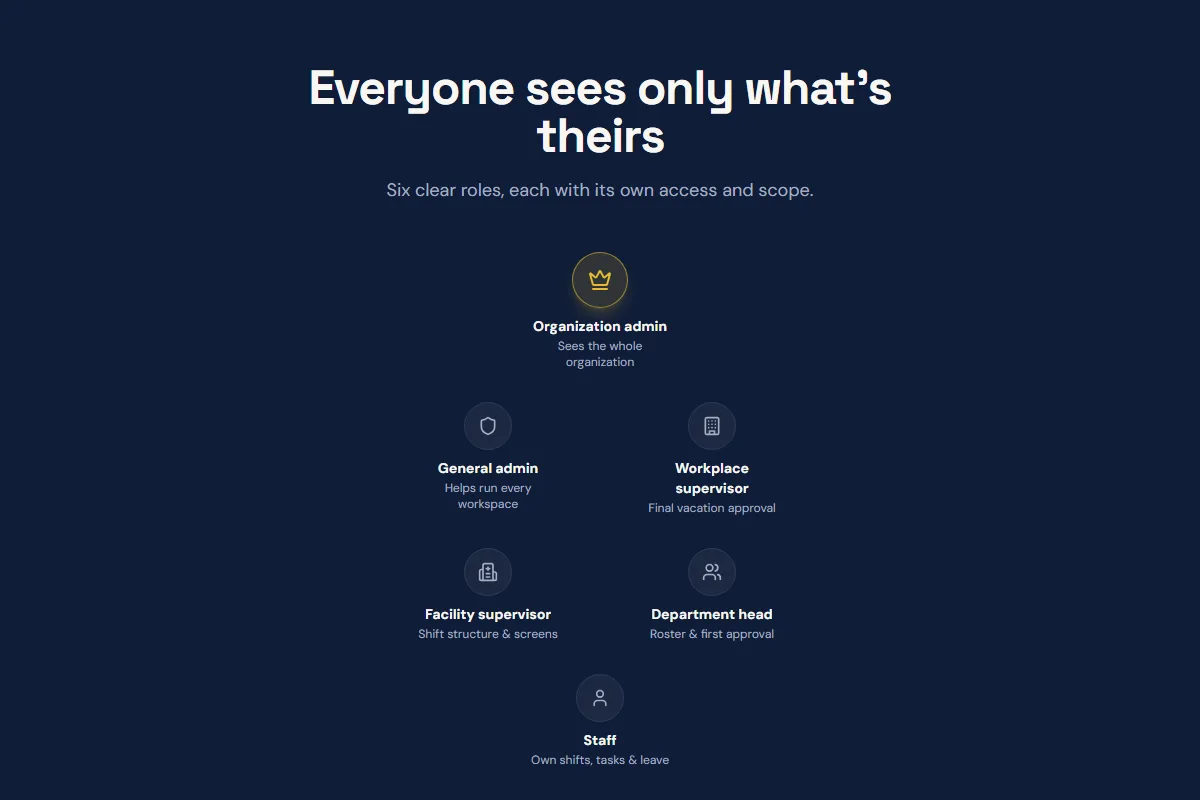
What makes it custom is the rules. A vacation request climbs three levels of approval, from the department head to the workplace supervisor, and the system checks for clashes when colleagues in one speciality ask for the same days. Access is split across six roles, each confined to its own corner of the organization, and every edit is written to an audit trail. Those rules are exactly what step 1 asks you to write down.
SpeedyPrint, the South African print store
Shoppers on SpeedyPrint lay out labels, stamps, trophies and race numbers in a browser editor, and a CSV upload turns one design into a print run where each piece carries its own name or number. Every order generates a proof and a print-ready production file, with a log of each status change. Checkout is PayFast, wired up through its payment webhooks, alongside transactional email and an admin panel that splits staff across three roles.
The stack is Next.js 15 and React in TypeScript, with Supabase for data. Read against step 5, the build rents what is common and writes what is particular: payments go through PayFast and the records live in Supabase, while the design editor and the variable-data print jobs were written for this one business. That split is where the budget of a custom build should go.
Five signs you are ready to start.
You do not need a specification before you talk to a builder. You do need the five things below, and each one comes with what to do first if it is missing.
- You have watched the work being done. Not heard about it in a meeting: sat with the people who do it. If you have not, spend a day with them first, because the stalls they work around never appear in a summary.
- You can say why the products you tried fell short. If you have trialled none, trial two. Either one fits and you saved a build, or you now know the exact gap the software has to fill.
- You have opened the data it will start with. Export a sample from the old tool or spreadsheet and look at it. Duplicates, blank fields and three spellings of one customer are cheap to find now and expensive to find in testing.
- The budget covers the first year, not just the launch. That means the build, a reserve for changes, and a year of upkeep. If only the build is funded, cut the first version until all three fit.
- Someone on your side has time every week. Builds stall while questions wait. If nobody can answer within a day and test each demo, settle who will before signing anything.
When all five hold, give every builder you talk to the same written problem, so the quotes that come back can be compared. The free quote checker converts a quoted price and its hours into the hourly rate behind them, and our page on custom software development services lists six checks for setting two proposals side by side.
Questions buyers ask before they commit.
How much does it cost to build a custom software?
A SaaS MVP with us usually costs $30,000 to $80,000, a focused first version of other custom software $40,000 to $150,000, and a complex enterprise platform $250,000 to $500,000 or more. Integrations, user roles, data migration and compliance decide where a build lands inside those bands; the screen count matters far less. After launch, plan for upkeep each year worth 10 to 20 percent of what the build cost. Our cost guide breaks the price down driver by driver.
What software can I use to build my own app?
For a simple app without code, Bubble, Glide and Microsoft Power Apps are common choices, and Retool suits internal admin tools. If you can program, a mainstream stack such as React or Next.js with a PostgreSQL database will take you further, and React Native or Flutter covers phones. Choose by who will maintain the app next year, not by which tool gives the best demo today.
How hard is it to build your own software?
A small tool for your own use is within reach of a patient beginner with a no-code platform or an AI assistant. Software that other people depend on is harder in ways that have little to do with typing code: deciding what it should do, keeping data safe, handling errors, hosting it, and fixing it when it breaks at a bad moment. That second kind usually needs people with design, engineering and testing skills.
Can ChatGPT build me an app?
It can write code for a small app or a working prototype if you describe it clearly and can run what it gives you. It cannot take responsibility for the result. Security, permissions, hosting, moving your data and fixing what fails in use all still need someone who understands the code. Use its output as a first draft, then have an engineer review it before anyone relies on it.
Is a custom build still worth it now that no-code tools exist?
Often, yes, but later than people assume. Start on no-code when a small team needs a tool quickly and the rules are simple. Move to a custom build when the rules outgrow the platform, when permissions get complicated, or when platform fees climb with every new user. The no-code vs custom calculator puts a platform's fees beside a build's cost across two to five years.
How do you make software that can connect to tools that have not been invented yet?
You cannot predict the tools, but you can make connecting cheap. Keep the records in a clean, documented data model, put each outside connection behind its own API layer instead of wiring tools straight into each other, and publish events through webhooks so a new tool can subscribe later. A future integration then means adding one connector, not rewriting the core. Our API development and integration page covers that layer.
What should I expect when working with a custom software company?
A good one asks more than it tells on the first call, puts the scope in writing before it quotes, and shows you working software every week or two once the build starts. Expect to give time yourself: quick answers, testing each build, and decisions. Before you sign, confirm the code and cloud accounts will be in your name and what documents you receive at the end.
How long does a custom software build take?
Most focused builds take a few months. With us, discovery takes two weeks, then the build runs 8 to 12 weeks for an MVP, or 16 to 28 for a production platform. In GoodFirms' 2026 survey, about two thirds of the firms asked put their typical project at three to six months. Integrations and data migration stretch a schedule more than extra screens do, and the timeline calculator estimates the weeks from your own hours, team size and buffer.
Is custom software more secure than off-the-shelf software?
Not by default. A widely used product has been attacked and patched many times, while new code has not been tested in the wild. Custom software can be safer when permissions are enforced in the database, secrets stay on the server, data is encrypted, changes are logged, and someone keeps patching it after launch. Ask any builder how they handle each of those before you sign.
Last reviewed .
Bring the problem, leave with a plan.
Bring the workflow you want to change and the people who would use the new system. The 30-minute call is free, a written scope and quote follow within 48 hours, and if something on the market already fits, we will point you to it rather than quote a build.
Clients rate us 5.0 on Clutch from 66 verified reviews (checked 13 October 2026).
Why work with Digital Heroes









115 people across five studios in New York, Delhi, London, Sydney and Lucknow, shipping ecommerce, web, software and mobile work for founder-led brands. Senior engineers only, no account-manager relay, and the same team from kickoff to launch.
- Shopify Select Partner, as listed in the Shopify Partner Directory
- Tier 1 registered supplier on the United Nations Global Marketplace, which requires audited company documentation
- Top Rated Plus on Upwork, the bracket for the top 3% of talent by client outcomes
- 397 public five-star-weighted reviews across four Fiverr gigs, from clients in 36 countries
- DUNS verified business, No. 650878346, so procurement can check us before signing
- Listed by Clutch in Top 1000 Global B2B Companies and Top Web Designers 2024
- Verified profiles on GoodFirms, DesignRush, Digital.com, AppFutura and TopDevelopers
- 2,000+ brands built across 40+ countries, with $50M+ in client revenue scaled

More from Divyansh.
Chief Technology Officer · Lucknow · 50 posts on the site
Published .


