ERP Implementation in New York: Process, Timeline, Cost & Vendor Guide (2026)
ERP implementation is the process of moving a business from its existing systems and workflows into a new enterprise resource planning environment and preparing the organization to operate successfully on it.
For a New York business, that may involve finance, inventory, procurement, sales, operations, multiple locations, legacy applications, integrations, historical data and different user groups.
The challenge is therefore not simply installing ERP software. It is aligning people, processes, data, technology and controls around the new system.
This guide explains ERP implementation in New York from a buyer's perspective, including the implementation process, platform selection, migration, integrations, security, testing, training, timeline, cost, total cost of ownership, implementation services and how to evaluate an ERP implementation or development partner.
What Is ERP Implementation?
ERP implementation is the structured process of selecting, planning, configuring, integrating, migrating, testing and deploying an ERP system.
Depending on the project, implementation can involve:
- Business requirements discovery
- ERP platform selection
- Process mapping
- Solution architecture
- System configuration
- Custom development
- Data migration
- Third-party integrations
- Security configuration
- Testing and UAT
- Employee training
- Cutover planning
- Go-live
- Post-launch support
The important distinction is:
ERP implementation is broader than ERP installation.
A system can be technically deployed while the business is still unprepared to use it.
Why ERP Implementation in New York Requires Careful Planning
New York itself does not automatically make an ERP project more complex. Complexity comes from the organization's operating model.
A business may have:
- Multiple offices or operating locations
- Multiple legal entities
- Different departments sharing operational data
- Existing accounting systems
- CRM or ecommerce platforms
- Warehouse or inventory systems
- Banking and payment integrations
- Large historical datasets
- Different approval structures
- Multiple user roles
- Legacy applications
The implementation team should understand the current environment before deciding what should be configured, migrated, integrated or rebuilt.
A useful principle
Define business requirements before locking the technical solution.
ERP Implementation Process in New York
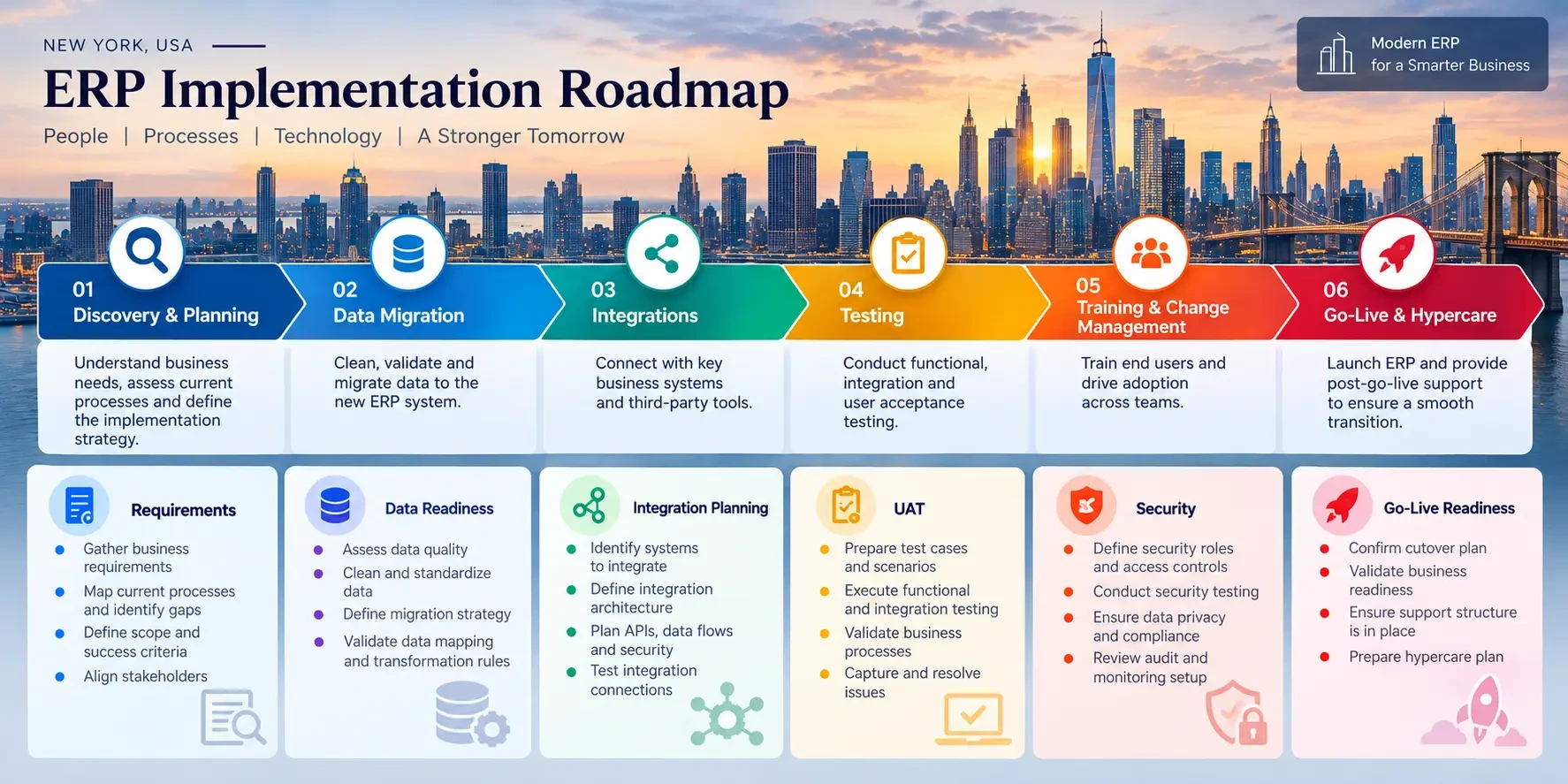
A well-managed ERP project should have clearly defined stages, deliverables and decision points.
- Discovery and Requirements Analysis
- ERP Platform Selection
- Solution Design and Configuration
- Data Migration
- ERP Integrations
- Custom ERP Development
- Testing and User Acceptance Testing
- Training and Change Management
- Go-Live and Hypercare
The goal is to make each stage produce enough information for the next major project decision.
1. Discovery and Requirements Analysis
The first stage establishes what the business actually needs.
Typical activities include:
• Current-process analysis
• Department interviews
• User-role identification
• Workflow mapping
• Approval-process documentation
• Reporting requirements
• Data-source identification
• Integration inventory
• Pain-point analysis
• Future-state requirements
What should the buyer receive?
The discovery stage should make clear:
• What is in scope
• What is out of scope
• Which processes will change
• What data must be migrated
• What integrations are required
• Which requirements need customization
2. ERP Platform Selection
If the ERP has not already been selected, platform fit should be evaluated before implementation begins.
Consider:
• Business size
• Required modules
• Number of users
• Industry requirements
• Existing technology ecosystem
• Integration requirements
• Reporting
• Security
• Customization
• Scalability
• Licensing
• Long-term ownership
Common platforms to evaluate
| Platform | Often considered for | Strengths to evaluate | Key implementation consideration |
|---|---|---|---|
| Microsoft Dynamics 365 | Organizations already using Microsoft technologies | Broad business application ecosystem and integration options | Assess existing Microsoft systems, modules and customization requirements |
| Oracle NetSuite | Cloud ERP and financial management | Broad cloud business-management capabilities | Evaluate configuration, integrations and long-term licensing |
| SAP | Larger or complex organizations | Broad enterprise functionality | Assess implementation governance, integration scope and customization |
| Oracle ERP | Broader enterprise requirements | Enterprise finance and operational capabilities | Define required modules, integrations and organizational complexity |
| Odoo | Modular ERP deployments | Modular approach and extensibility | Determine which requirements can use standard modules versus customization |
There is no universally best ERP platform. The right choice depends on business processes, required modules, users, entities, integrations, industry requirements, scalability, licensing and the amount of customization the organization can reasonably maintain.
3. Solution Design and Configuration
Once requirements and platform fit are established, the implementation team designs the target environment.
This can include:
• Organization structure
• User roles
• Permissions
• Approval rules
• Workflows
• Finance configuration
• Inventory structures
• Reporting
• Dashboards
• Notifications
• Business entities
• Data relationships
Standard ERP functionality should generally be used where it adequately meets the requirement.
Customization should have a clear business reason.
Does this customization solve an important requirement that standard configuration cannot reasonably address?
Implementation vs. Configuration vs. Customization
ERP implementation is the broader project of deploying and adopting the system.
ERP configuration adjusts standard ERP functionality to match business requirements.
ERP customization modifies or extends the system when standard configuration cannot adequately support a requirement.
Custom ERP development goes further by building specialized functionality, modules, workflows, applications or integrations around the ERP.
When standard ERP functionality does not adequately support a critical business requirement, businesses may evaluate ERP development services to extend the platform with custom workflows, modules, integrations or applications.
4. Data Migration
Data migration is one of the areas most likely to affect both timeline and go-live readiness.
A typical migration flow is:
Extract → Profile → Clean → Map → Transform → Test → Reconcile → Cut Over
Migration may involve:
• Identifying source systems
• Profiling existing data
• Removing duplicates
• Correcting invalid records
• Mapping fields
• Transforming formats
• Loading test data
• Validating records
• Reconciling totals
• Performing migration rehearsals
• Executing final migration
Microsoft's Dynamics 365 data migration guidance recommends planning migration early and using testing and validation rather than treating migration as a final one-time activity.
5. ERP Integrations
An ERP rarely operates alone.
It may need to connect with:
• CRM
• Ecommerce
• Payment systems
• Warehouse management
• HR systems
• Banking systems
• Shipping platforms
• Analytics systems
• Customer portals
• Internal applications
For every integration, determine:
1. What data moves?
2. In which direction?
3. How frequently?
4. How is authentication handled?
5. What happens when the external system is unavailable?
6. How are errors recorded?
7. How are duplicates prevented?
8. How is the integration tested?
6. Custom ERP Development
Custom ERP development becomes relevant when standard ERP configuration and available integrations cannot reasonably support an important business requirement.
Common examples include:
• Custom workflows
• Bespoke modules
• Unique approval logic
• Specialized reporting
• Legacy system modernization
• Complex integrations
• Industry-specific functionality
• Custom customer or employee portals
• Specialized automation
The objective should not be to customize the ERP simply because customization is possible. The better question is whether custom development creates enough business value to justify its implementation, testing, maintenance and future upgrade requirements.
For requirements that extend beyond ERP functionality into broader application architecture, businesses may also evaluate custom software development.
For businesses evaluating that route, ERP development services can be considered alongside standard ERP implementation and configuration approaches.
What Do ERP Implementation Services Include?
ERP implementation services typically cover the activities required to move from business requirements to a functioning and supported ERP environment.
| Service area | Typical activities |
|---|---|
| Discovery | Requirements, process mapping and scope definition |
| Configuration | Workflows, roles, permissions and system settings |
| Migration | Data cleansing, mapping, transformation and validation |
| Integration | Connecting ERP with business systems and APIs |
| Customization | Extending standard functionality where necessary |
| Testing | Functional, integration, migration and UAT |
| Training | Role-based employee and administrator training |
| Deployment | Cutover, go-live and production readiness |
| Hypercare | Post-launch support, issue resolution and stabilization |
Complex ERP environments may also require broader software development services for connected applications, APIs and supporting systems.
7. Testing and User Acceptance Testing
Testing should begin during implementation rather than being postponed until the final week. Microsoft's Dynamics 365 testing guidance recommends planning testing early and defining appropriate test scope, cycles, ownership and environments, including UAT, migration and security testing.
Depending on the project, testing can include:
• Functional testing
• Integration testing
• Data migration testing
• Regression testing
• Performance testing
• Security testing
• User acceptance testing
UAT should use real business scenarios, such as:
• Creating an order
• Approving a purchase
• Processing an invoice
• Receiving inventory
• Running a financial report
• Updating customer information
• Handling an exception
A technically functioning ERP can still fail operationally if employees cannot complete the workflows they actually perform.
8. Training and Change Management
ERP implementation changes how employees perform daily work.
Training should therefore be role-specific.
Finance users may need different training from:
• Sales teams
• Procurement teams
• Warehouse employees
• Managers
• Administrators
Change management can include:
• Communication
• Role-based training
• Documentation
• Process ownership
• Support channels
• Escalation procedures
9. Go-Live and Hypercare
Go-live should be treated as a controlled transition rather than simply switching the ERP into production.
Before launch, confirm:
• Critical testing is complete
• Migration procedures are approved
• Production environment is ready
• Users have completed training
• Cutover steps are documented
• Support ownership is established
• Stakeholders have signed off
• A post-launch support process is ready
A detailed cutover plan should also define responsibilities, sequencing, verification, rollback procedures and the go/no-go decision.
Microsoft's Dynamics 365 go-live checklist provides a useful readiness framework covering testing, migration readiness, stakeholder signoff, change management and operational support.
The first period after launch is often referred to as hypercare, when the implementation team focuses on resolving issues, monitoring integrations and helping users stabilize new workflows.
How Long Does ERP Implementation Take in New York?
There is no universal ERP implementation timeline.
Current published guidance shows a wide range because ERP projects differ substantially in scope and complexity.
Current 2026 guidance illustrates that variation: published ERP research commonly places many implementations within several months to more than a year, while broader implementation guidance can extend from weeks for narrowly scoped deployments to 24 months or more for complex programs.
For planning purposes:
| Project profile | Approximate planning context |
|---|---|
| Focused rollout | Several weeks to a few months |
| Small implementation | About 3–6 months |
| Mid-market implementation | About 6–12 months |
| Complex enterprise program | 12–24+ months can occur |
These are planning contexts, not guarantees.
Timeline variables include:
• Modules
• Users
• Locations
• Entities
• Integrations
• Data quality
• Customization
• Testing
• Training
• Internal decision-making
• Subject-matter expert availability
A realistic project plan should show assumptions and dependencies instead of only promising a go-live date.
How Much Does ERP Implementation Cost in New York?
There is no reliable universal New York ERP implementation price.
The total project cost can include:
| Cost component | What it covers |
|---|---|
| Licensing | Subscription or software license |
| Implementation | Planning, configuration and delivery |
| Migration | Extraction, cleansing, mapping and loading |
| Integrations | Connections to external systems |
| Custom development | Functionality beyond standard configuration |
| Testing | Functional, integration and UAT |
| Training | Employee and administrator training |
| Go-live | Cutover and launch activities |
| Support | Stabilization and post-launch assistance |
Published ERP cost research shows a very wide market range, so third-party figures should be treated as planning references rather than a New York average or a Digital Heroes quote.
The better question is:
What exactly is included in the implementation estimate, and what costs remain outside it?
For a more detailed vendor-evaluation framework, see this how to hire an ERP software development company checklist.
What Should an ERP Implementation Proposal Include?
| Proposal factor | Questions to ask |
|---|---|
| Scope | What exactly is included? |
| Modules | Which modules are being implemented? |
| Integrations | Which systems are included? |
| Migration | Who owns cleansing, mapping and validation? |
| Customization | Which custom work is included? |
| Testing | What testing and UAT are included? |
| Training | Who is trained and how? |
| Timeline | What assumptions determine the schedule? |
| Project team | Who will actually perform the work? |
| Assumptions | What does the price depend on? |
| Exclusions | What is specifically excluded? |
| Change requests | How are scope changes priced? |
| Support | What happens after go-live? |
| SLA | What support commitments apply? |
Total Cost of Ownership for ERP
Comparing ERP proposals only by implementation price can produce a misleading result.
Initial costs
• Software licensing
• Implementation
• Configuration
• Migration
• Integrations
• Custom development
• Testing
• Training
Ongoing costs
• Subscription or license renewals
• Support
• Maintenance
• Upgrades
• Additional users
• Future integrations
• Optimization
• Internal administration
Instead of asking:
“Which vendor is cheapest?”
ask:
“What will this solution cost to implement, operate and evolve over the period we expect to use it?”
That provides a more meaningful comparison.
Think Beyond the First Invoice
A useful ERP business case should compare:
Initial implementation cost → ongoing operating cost → longer-term total cost of ownership.
A five-year TCO model can include software licensing, implementation, support, additional users, integrations, upgrades, customization and internal administration.
The exact period should reflect the organization's expected ERP lifecycle rather than being treated as a universal accounting rule.
ERP Security, Compliance and Industry Considerations
Security should be treated as an implementation workstream alongside migration, integrations and testing because access, authentication and control requirements can affect configuration, testing and go-live readiness.
Security planning should consider both the ERP platform and the connected systems around it. Access should follow least-privilege principles, with appropriate role separation, auditability, authentication controls, backup and recovery procedures, and security testing.
Review:
• Role-based access
• Least privilege
• Segregation of duties
• Audit logging
• Encryption
• Backup and recovery
• Administrative access
• Security testing
• Integration authentication
Industry requirements also affect implementation scope.
Manufacturing: production, inventory, procurement and supply chain.
Retail/ecommerce: orders, inventory, payments and fulfillment.
Professional services: projects, resources, time tracking and billing.
Healthcare/life sciences: access controls, auditability, security and applicable compliance requirements.
How to Measure ERP Implementation Success
A successful implementation should be measured by business outcomes, not simply whether the system went live.
Useful KPIs can include:
• Order-processing time
• Inventory accuracy
• Invoice-processing time
• Month-end close time
• Manual data-entry volume
• Report-generation time
• Integration errors
• User adoption
• Support tickets
• Process cycle time
Where possible, establish a baseline before implementation and compare performance after stabilization.
Do not assume a successful go-live automatically means a successful ERP project.
Common ERP Implementation Mistakes
| Mistake | Why it matters |
|---|---|
| Selecting software before requirements | The platform may not fit actual workflows |
| Underestimating migration | Poor data can create rework |
| Ignoring integrations | Hidden technical scope may appear late |
| Testing too late | Less time remains to fix defects |
| Treating training as an afterthought | Users may struggle with new workflows |
| Excessive customization | Maintenance and upgrade complexity increases |
| Unclear project ownership | Decisions become slower |
| Comparing proposals only by price | Important services may be excluded |
How to Choose an ERP Implementation and Development Partner in New York
Evaluate:
• Discovery methodology
• Relevant ERP experience
• Technical architecture
• Migration capability
• Integration expertise
• Custom development capability
• Testing methodology
• Security practices
• Actual project team
• Communication process
• Pricing assumptions
• Documentation
• Post-launch support
Before signing, verify:
• Relevant case studies
• Client references
• Sample project plans
• Sample deliverables
• Actual project-team structure
• Relevant certifications or partnerships where applicable
• Security practices
• Support SLA
• Similar-industry experience
The most useful question is:
What exactly are we buying, what assumptions does your estimate depend on, and what happens if those assumptions change?
How to Verify an ERP Partner's Claims
Buyers can verify a partner by reviewing relevant case studies, client references, actual project-team roles, platform certifications or partnerships where applicable, implementation methodology, technical capabilities, documentation practices and post-launch support arrangements.
ERP Implementation Red Flags
| Red flag | Why it matters |
|---|---|
| Guaranteed timeline before discovery | Scope may not be understood |
| Very low implementation quote | Migration, QA or support may be excluded |
| No migration plan | Data problems may surface late |
| No UAT plan | Business workflows may not be formally validated |
| No integration inventory | Hidden technical scope can emerge |
| Excessive customization | Maintenance complexity can increase |
| No named project owner | Decisions may become unclear |
| No post-go-live support | Operational issues may lack an owner |
| Unclear assumptions | Proposals become difficult to compare |
| Unclear exclusions | Additional costs may appear later |
| No change-control process | Scope changes may create cost and timeline disputes |
| No security discussion | Access and control requirements may be addressed too late |
When Should a Business Consider Custom ERP Development?
Custom ERP development becomes more compelling when standard ERP configuration cannot reasonably support a requirement that is important to the business.
Common examples include:
• Custom workflows
• Bespoke modules
• Unique approval logic
• Specialized reporting
• Legacy system modernization
• Complex integrations
• Industry-specific functionality
• Custom customer or employee portals
• Specialized automation
Before choosing custom development, compare the requirement against standard configuration, available extensions and existing integrations. Custom development should be justified by business value, implementation effort and long-term maintainability.
Standard configuration may be preferable when the ERP already handles the requirement adequately.
ERP Implementation Readiness Checklist
Before signing an ERP implementation proposal, confirm:
• Business objectives documented
• Required workflows documented
• Platform requirements defined
• Migration scope defined
• Data-cleansing responsibility assigned
• Integrations identified
• Security requirements reviewed
• Testing and UAT planned
• Training planned
• Cutover plan approved
• Assumptions documented
• Exclusions documented
• Change-request process defined
• Post-launch support defined
Frequently Asked Questions
How long does ERP implementation take in New York?
ERP implementation can take several months for many small and mid-market projects, while complex enterprise programs can take a year or longer. The actual timeline depends on modules, users, entities, integrations, data quality, customization, testing and internal decision-making.
How much does ERP implementation cost?
There is no reliable universal ERP implementation price for New York. Cost depends on licensing, implementation services, migration, integrations, customization, testing, training, support and the complexity of the business environment. Third-party market ranges should be treated as planning references rather than a Digital Heroes quote.
What is included in ERP implementation?
ERP implementation can include requirements discovery, platform selection, configuration, data migration, integrations, customization, testing, training, deployment, go-live and post-launch support.
What is the difference between ERP implementation and ERP development?
ERP implementation focuses on deploying and adopting an ERP system, including configuration, migration, integrations, testing and training. ERP development focuses on building or extending functionality when standard ERP capabilities cannot adequately support the required workflows, modules, integrations or applications.
How do I choose an ERP implementation company?
Compare providers on discovery methodology, ERP experience, migration capability, integration expertise, custom development capability, testing, security, project ownership, documentation, pricing assumptions and post-launch support. Verify important claims with references, case studies and project evidence where available.
When does custom ERP development make sense?
Custom ERP development makes sense when a critical workflow, integration, module, report or application cannot reasonably be supported through standard configuration or existing extensions. The decision should also consider maintenance, upgrade and total-cost implications.
What should an ERP implementation proposal include?
An ERP implementation proposal should clearly define scope, modules, integrations, migration, customization, testing, training, timeline, project responsibilities, assumptions, exclusions, change requests, pricing and post-go-live support.
Ready to Plan Your ERP Project?
Planning an ERP implementation or custom ERP project?
If your requirements extend beyond standard configuration into integrations, custom workflows, automation or specialized functionality, explore ERP development services to evaluate the appropriate development approach.